Building a Receptionist Agent using OpenAI Agents SDK: Gateway Agent Example
In this example, we build a receptionist-style AI agent using the OpenAI Agents SDK. This type of agent is often called a gateway agent because its main job is not to answer questions directly, but to route user queries to the correct specialized agent.
Building a Receptionist Agent using OpenAI Agents SDK
You can think of this agent exactly like a receptionist in an office. You don’t explain every detail to the receptionist. You simply say what you need, and they decide who should handle your request.
What This Receptionist Agent Is Designed To Do?
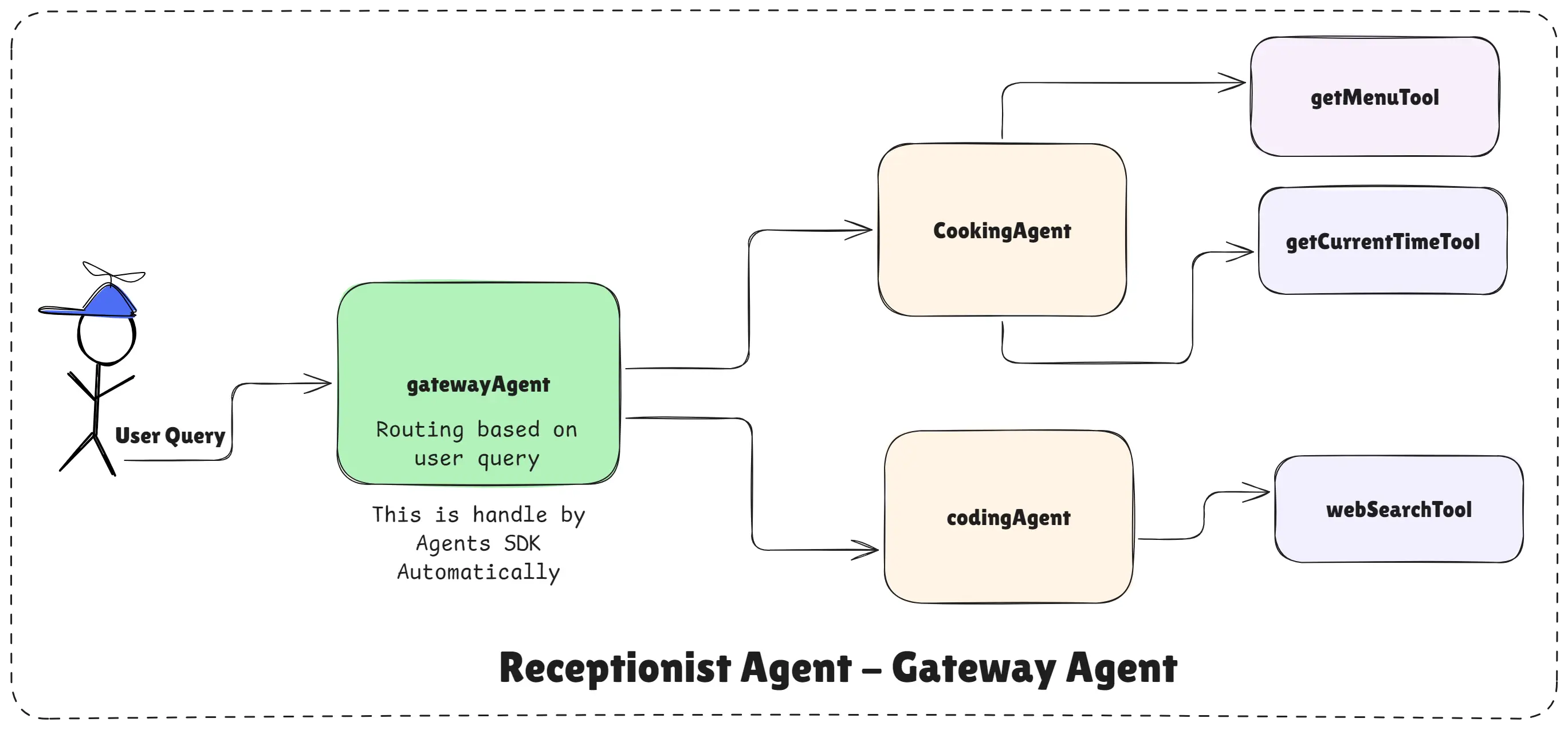
Receptionist Agent - Gateway Agent
This receptionist agent is designed to act as a smart gateway between multiple specialized AI agents. Instead of answering questions itself, it understands the user’s intent and forwards the query to the right expert agent.
In this example, the receptionist decides whether the user needs:
- Cooking related help, or
- JavaScript / coding related help
The user interacts with one AI, but internally the system routes the request correctly.
In real-world AI applications, users ask mixed questions:
Someone may ask about food, restaurants, or menus. Another user may ask about JavaScript, coding, or debugging. Without a receptionist agent, developers usually:
- Write manual if-else routing logic
- Maintain separate chat systems
- Hardcode conditions that break as the system grows
The OpenAI Agents SDK solves this problem using handoffs, where one agent intelligently delegates work to other agents.
Agents Used in This Example
This system uses three agents, each with a single responsibility.
The Cooking Agent handles cooking-related queries, restaurant menus, prices, and time-based meal suggestions.
The Coding Agent handles JavaScript-related questions. It can explain concepts, write code, debug problems, and even search MDN documentation using a web search tool.
The Gateway Agent acts as the receptionist. It analyzes the user query and decides whether it should be handled by the cooking agent or the coding agent.
Each agent stays focused on its own domain, which makes the system more accurate and easier to scale.
Step 1: Creating Specialized Agents
Before building the receptionist, we first create specialized agents.
One agent is a Cooking Agent, which handles food, recipes, menus, prices, and meal suggestions.
// cooking-agent.js
import "dotenv/config";
import { Agent, tool } from "@openai/agents";
import { z } from "zod";

// Create a specialized Cooking Agent
const getCurrentTimeTool = tool({
  name: "get_current_time",
  description: "This tool returns the current date and time as a string.",
  parameters: z.object({}),
  execute: async () => {
    return new Date().toString();
  },
});

const getMenuTool = tool({
  name: "get_menu",
  description:
    "This tool fethes and returns the menu of a restaurant given its name.",
  parameters: z.object({
    restaurant_name: z.string().describe("The name of the restaurant"),
  }),
  execute: async ({ restaurant_name }) => {
    const menu = {
      "restaurant a": [
        {
          Drinks: {
            Chai: "INR 50",
            Coffee: "INR 70",
          },
          Veg: {
            DalMakhni: "INR 250",
            Panner: "INR 400",
          },
        },
      ],
      "restaurant b": [
        {
          Drinks: {
            Lemonade: "INR 40",
            Mojito: "INR 120",
            Lahori: "INR 150",
          },
          NonVeg: {
            ChickenCurry: "INR 350",
            MuttonBiryani: "INR 500",
          },
          Veg: {
            VegBiryani: "INR 300",
            MixVeg: "INR 200",
          },
        },
      ],
    };
    return (
      menu[restaurant_name.toLowerCase()] ||
      "Menu not found for this restaurant."
    );
  },
});

export const cookingAgent = new Agent({
  name: "Cooking Agent",
  model: "gpt-4.1-mini",
  tools: [getCurrentTimeTool, getMenuTool],
  instructions: `
    You are a cooking assistant who is speacialized in cooking food.
    Help users with recipes, cooking tips, and meal ideas. Always help them to cook the
    foods they want to cook.

    Your Responsibilities for Cooking-Related Queries:
    If the user asks for a recipe, provide a detailed recipe with ingredients
    and step-by-step instructions.
    If the user asks for cooking tips, provide useful and practical advice.
    If the user asks for meal ideas, suggest creative and delicious meal options based
    on their preferences and dietary restrictions.

    Your Responsibilities for Restaurant Menu Queries:
    If the user asks for the menu of a restaurant, use the get_menu tool to fetch the
    menu.
    If the user asks for the price of a specific dish or drink in a restaurant, use the
    get_menu tool to fetch the menu and provide the price.
    If the user asks for recommendations based on the menu, use the get_menu tool to
    fetch the menu and suggest dishes or drinks.
    If the user asks for the current time to suggest a meal, use the get_current_time
    tool to fetch the current time and suggest a meal accordingly.

    Important Notes:
    If the user asks for something unrelated to cooking or restaurant
    menus, politely inform them that you can only assist with cooking
    and restaurant menu-related queries.
    Always use the provided tools to fetch real-time information when needed.

    Tone and Style:
    Always respond in a friendly and helpful manner.
    Use clear and concise language that is easy to understand.
    `,
});
Another agent is a Coding Agent, which focuses only on JavaScript concepts, examples, debugging, and explanations, using MDN when needed.
// coding-agent.js
import "dotenv/config";
import { Agent, webSearchTool } from "@openai/agents";

// Create a specialized Coding Agent
export const codingAgent = newAgent({
name: "Coding Agent",
tools: [webSearchTool("https://developer.mozilla.org/en-US")],
instructions: `
    You are a coding assistant particularly skilled in JavaScript. You help users with
    coding-related queries such as writing code snippets, debugging, and explaining concepts.

    Responsibilities:
    - Answer only coding-related questions
    - Use MDN Web Docs for accurate references when needed
    - Explain concepts in simple language

    Output Format:
    {
      code: "your code snippet here",
      explanation: "your explanation here",
      references: ["list of references"]
    }

    If the query is not coding-related, respond politely that you can only help with coding.
  `,
});
Each agent is designed for one clear responsibility. This keeps answers accurate and avoids confusion.
Step 2: Creating the Receptionist (Gateway) Agent
The receptionist agent is created using handoffs.
// gatway-agent.js
import "dotenv/config";
import { Agent } from "@openai/agents";
import { cookingAgent } from "./cooking-agent.js";
import { codingAgent } from "./coding-agent.js";

// Create a Gateway (Receptionist) Agent using handoffs
export const getewayAgent = Agent.create({
name: "Gateway Agent",
handoffs: [cookingAgent, codingAgent],
instructions: `
    You are a gateway agent that routes user queries to the correct specialized agent.

    Available agents:
    1. Cooking Agent – handles food, recipes, and restaurant-related queries
    2. Coding Agent – handles JavaScript and coding-related queries

    Your job is to analyze the user query and forward it to the most suitable agent.
    If the query is ambiguous, choose the best possible agent.
  `,
});
Its only job is to:
- Read the user’s query
- Understand whether it is cooking-related or coding-related
- Forward the query to the correct agent
This routing logic is handled automatically by the OpenAI Agents SDK, based on the instructions you provide.
The receptionist does not cook food. The receptionist does not write code. It simply connects the user to the right expert.
Step 3: Running the Receptionist Agent
// index.js
import "dotenv/config";
import { run } from "@openai/agents";
import { getewayAgent } from "./gateway-agent.js";

// Run the agent with runner (text input/chat input)
const chatWithAgent = async (query) => {
  const result = await run(getewayAgent, query);
  console.log("History :", result.history);
  console.log("Last Agent :", result.lastAgent.name);
  console.log("Final Output :", result.finalOutput);
};

// Example usage
chatWithAgent(
  `I am a biginner in JavaScript. Can you help me understand
   closures with a simple example?`
);
When the system runs:
- The user sends a single query
- The receptionist agent receives it
- The query is handed off internally to the correct agent
- The final response is returned to the user
The user never sees the internal routing. From their perspective, it feels like one intelligent assistant.
How the Receptionist Agent Thinks and Acts?
When a user sends a query, the gateway agent reads it and understands the intent.
If the query is cooking-related, it hands the request to the cooking agent.
If the query is coding-related, it hands the request to the coding agent.
This routing is handled automatically by the OpenAI Agents SDK, based on the agent instructions and handoffs. The user never sees this internal process. To them, it feels like a single intelligent assistant.
Why This Example Matters
This pattern solves a real production problem. As AI systems grow, one agent cannot handle everything reliably. By introducing a receptionist agent, you gain:
- Clean separation of responsibilities
- Safer and more accurate responses
- Easy scalability by adding new agents later
This is how real-world multi-agent AI systems are designed using the OpenAI Agents SDK.
Key Takeaway
This example shows how the OpenAI Agents SDK makes it easy to build multi-agent systems with clean separation of responsibilities.
Instead of one giant agent doing everything, you build:
- Small expert agents
- A smart receptionist agent
- A scalable and production-ready architecture
This is the foundation for building real-world AI applications that grow without becoming confused .
In the next articles, we will build a Cooking Agent used as a Tool by a Coding Agent. This pattern is useful when one agent needs to call another agent as a tool to get specialized help.
Happy agent building with OpenAI Agents SDK!