Building a Streaming Storytelling Agent with OpenAI Agents SDK: Real-Time Token Streaming
In this example, we build a streaming storytelling agent using the OpenAI Agents SDK. The goal is to show how an agent can generate responses live, token by token, instead of waiting for the full answer to finish. This is especially useful for experiences like storytelling, voice assistants, live chats, or real-time dashboards where users expect immediate feedback.
Streaming Storytelling Agent
Unlike normal agents that return a complete response at the end, a streaming agent starts responding as it thinks, making the interaction feel faster and more human.
What This Streaming Storytelling Agent Is Designed To Do
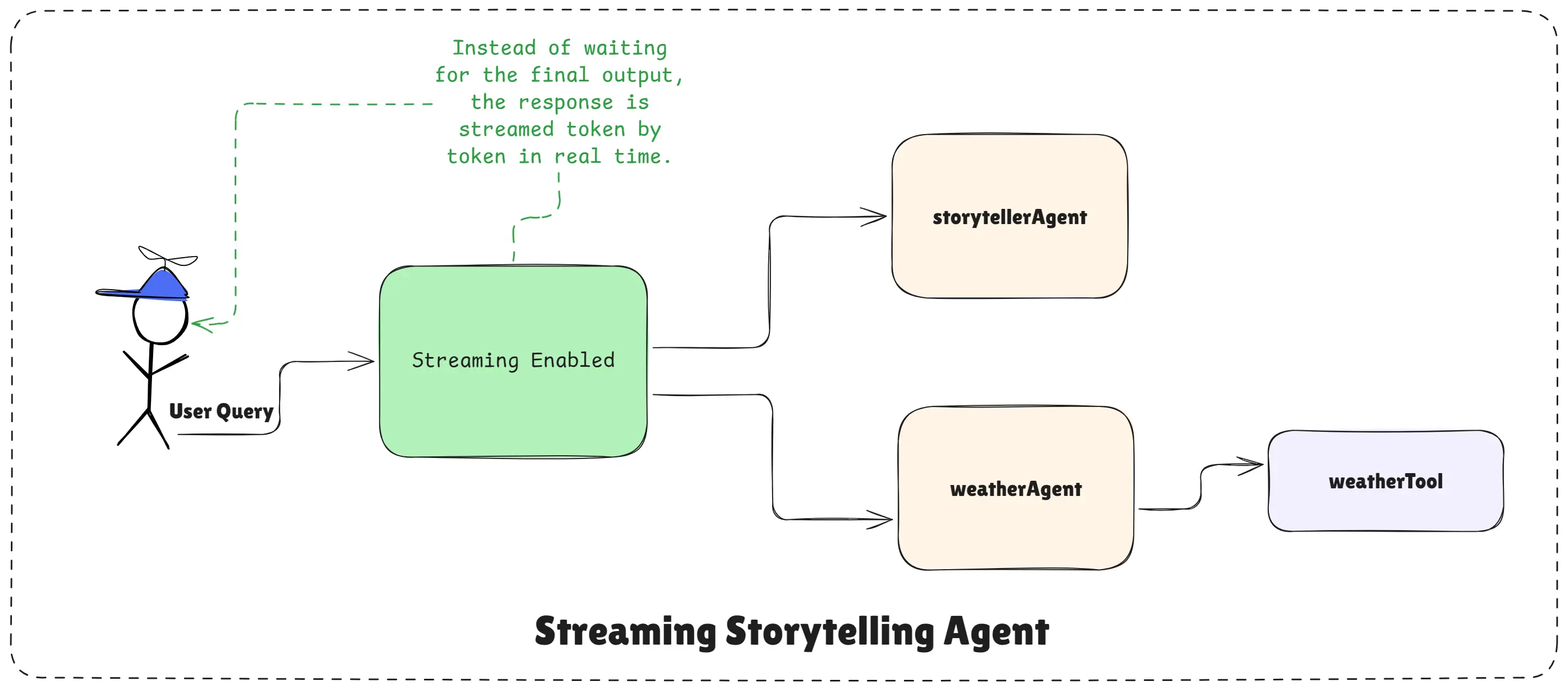
Streaming Storytelling Agent Design
This agent has one simple responsibility: tell short, engaging stories based on a given topic. It does not answer general questions, write code, or perform unrelated tasks. Its focus is storytelling only.
In the same setup, we also demonstrate a weather agent that streams live weather information. This helps you understand that streaming is not limited to creative text, it works equally well with tool-based agents.
Why Streaming Matters
Streaming is important when you want to improve user experience. Instead of showing a loading spinner, users see the response appearing gradually. This makes AI feel more responsive and alive.
The OpenAI Agents SDK supports streaming out of the box through the Runner, so you do not need to manage low-level token handling yourself.
Step 1: Creating the Storytelling Agent
The storytelling agent is created with clear instructions. It is told to generate short, engaging stories and nothing else. This keeps the agent focused and predictable.
import "dotenv/config";
import { Agent } from "@openai/agents";

// Create a simple storytelling agent
const storytellerAgent = new Agent({
  name: "Storyteller",
  instructions:
    `You are a storyteller. You will be given a topic and you will tell a story about it.
     Make it engaging and interesting. and give short and concise story.`,
});
This agent does not use any tools. It relies purely on the language model to create creative output.
Step 2: Creating a Tool-Based Agent for Streaming
To show that streaming also works with tools, we create a weather agent. This agent uses a tool to fetch real-time weather data and streams the response as it arrives.
import { tool } from "@openai/agents";
import { z } from "zod";
import axios from "axios";

// Create the weather tool
const weatherTool = tool({
  name: "get_weather",
  description: "Get the current weather for a given city.",
  parameters: z.object({
    city: z.string().describe("The city to get the weather for."),
  }),
  execute: async ({ city }) => {
    const url = `https://wttr.in/${city.toLowerCase()}?format=%C+%t`;
    const { data } = await axios.get(url, { responseType: "text" });
    return `The current weather in ${city} is ${data}`;
  },
});

// Add the weather tool to the agent
const weatherAgent = new Agent({
  name: "Weather Agent",
  tools: [weatherTool],
  instructions:
    `You are a weather assistant. You can provide the current weather for a given city
     using the get_weather tool.`,
});
This agent shows how streaming works even when the agent needs to call an external API.
Step 3: Running Agents with Streaming Enabled
Streaming is handled by the Runner. The runner controls execution and allows responses to be streamed in real time.
import { Runner } from "@openai/agents";

// Create a runner to run the agent
const runner = new Runner({
  model: "gpt-4o-mini",
});
Now we run both agents with streaming turned on.
Step 4: Streaming the Story in Real Time
When streaming is enabled, the agent returns a stream instead of a single response. We convert that stream into text and pipe it directly to the console.
const storytellerStream = await runner.run(
  storytellerAgent,
  "Tell me a story about Sundar Pichai, CEO of Google.",
  {
    stream: true,
  }
);

storytellerStream
  .toTextStream({
    compatibleWithNodeStreams: true,
  })
  .pipe(process.stdout);

await storytellerStream.completed;
As soon as the agent starts generating the story, text begins appearing in the console. There is no waiting for the full response.
Step 5: Streaming Tool-Based Output
The same streaming logic works for the weather agent.
const weatherStream = await runner.run(
  weatherAgent,
  "What is the weather in Bangalore?",
  {
    stream: true,
  }
);

weatherStream
  .toTextStream({
    compatibleWithNodeStreams: true,
  })
  .pipe(process.stdout);

await weatherStream.completed;
Here, the agent first calls the weather tool, then streams the final answer back to the user.
Complete Example Code
import "dotenv/config";
import { Agent, Runner, tool } from "@openai/agents";
import chalk from "chalk";
import { z } from "zod";
import axios from "axios";

// Storytelling agent
const storytellerAgent = new Agent({
  name: "Storyteller",
  instructions:
    "You are a storyteller. You will be given a topic and you will tell a story about it. Make it engaging and interesting. and give short and concise story.",
});

// Weather tool
const weatherTool = tool({
  name: "get_weather",
  description: "Get the current weather for a given city.",
  parameters: z.object({
    city: z.string().describe("The city to get the weather for."),
  }),
  execute: async ({ city }) => {
    const url = `https://wttr.in/${city.toLowerCase()}?format=%C+%t`;
    const { data } = await axios.get(url, { responseType: "text" });
    return `The current weather in ${city} is ${data}`;
  },
});

// Weather agent
const weatherAgent = new Agent({
  name: "Weather Agent",
  tools: [weatherTool],
  instructions:
    "You are a weather assistant. You can provide the current weather for a given city using the get_weather tool.",
});

// Runner
const runner = new Runner({
  model: "gpt-4o-mini",
});

// Run streaming examples
const init = async () => {
  console.log(chalk.bgCyan(" --- Story teller streaming ---
"));

  const storytellerStream = await runner.run(
    storytellerAgent,
    "Tell me a story about Sundar Pichai, CEO of Google.",
    { stream: true }
  );

  storytellerStream
    .toTextStream({ compatibleWithNodeStreams: true })
    .pipe(process.stdout);

  await storytellerStream.completed;

  console.log(chalk.bgCyan("

  --- Weather streaming ---
"));

  const weatherStream = await runner.run(
    weatherAgent,
    "What is the weather in Bangalore?",
    { stream: true }
  );

  weatherStream
    .toTextStream({ compatibleWithNodeStreams: true })
    .pipe(process.stdout);

  await weatherStream.completed;
};

init().catch((error) => {
  console.error("Error:", error);
  process.exit(1);
});
Key Takeaway
This example shows how powerful streaming agents can be with the OpenAI Agents SDK. You can build agents that respond instantly, feel more natural, and work seamlessly with tools.
You do not manage tokens, loops, or partial outputs manually. You simply enable streaming, and the SDK handles everything behind the scenes.
Streaming agents are ideal for storytelling, voice assistants, live dashboards, and any real-time AI experience where speed and engagement matter.
Happy agent building with OpenAI Agents SDK!