How to Build Multi AI Agents Using LangGraph?
Modern AI systems rarely rely on a single capability and Real-world applications need AI agents that can:
- Talk naturally
- Call multiple tools
- Fetch live data
- Decide when tools are needed
- Combine results into one final answer
This is where multi-agent workflows become important.

Multi AI Agents Using LangGraph
In this article, we’ll build a multi-tool AI agent using LangGraph by manually defining the workflow graph. This approach gives you full control over how the AI thinks, acts, and loops.
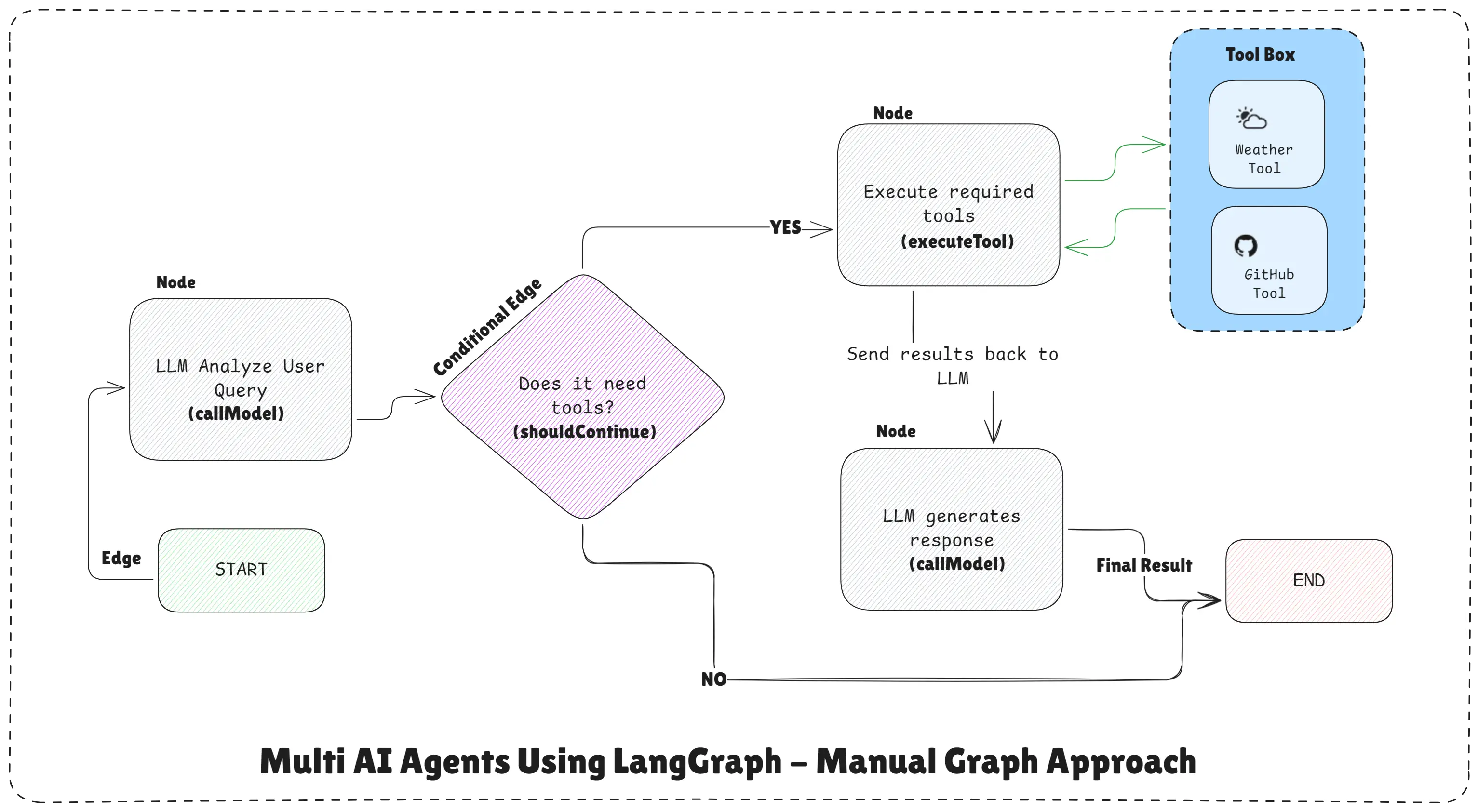
Multi AI Agents Using LangGraph - Manual Graph Approach
Official tools, agents, and LangGraph documentation:
What Do We Mean by “Multi AI Agents” Here?
In this example, multiple agents are logical roles, not separate servers:
- One agent reasons with the LLM
- One agent executes tools (Weather, GitHub)
- LangGraph coordinates them safely
Each agent has a clear responsibility, and LangGraph controls how they interact.
High-Level Workflow Design
This system follows a controlled loop, not free-form autonomy:
User Query
   ↓
LLM analyzes request
   ↓
Does it need tools?
   ├─ Yes → Execute tools
   │        ↓
   │     Send results back to LLM
   │        ↓
   │     LLM generates response
   └─ No  → End
The key idea is the LLM never controls execution. The graph does.
Define Tools (External Capabilities)
We define two tools using @langchain/core/tools:
Weather Tool
Fetches live weather for any city.
// Tool 1: Weather API - Get real-time weather by city
const weatherTool = tool(
  async ({ cityName }) => {
    console.log(`   🌤️  Fetching weather for: ${cityName}`);
    const url = `https://wttr.in/${cityName.toLowerCase()}?format=%C+%t`;
    try {
      const { data } = await axios.get(url, { responseType: "text" });
      return `The current weather in ${cityName} is ${data}`;
    } catch (error) {
      return `Error fetching weather: ${error.message}`;
    }
  },
  {
    name: "get_weather",
    description:
      `Get the current weather for a specific city.
        Use this when users ask about weather conditions.`,
    schema: z.object({
      cityName: z
        .string()
        .describe(
          "The name of the city to get weather for (e.g., 'London', 'Tokyo')"
        ),
    }),
  }
);
GitHub Profile Tool
Fetches public GitHub user data.
// Tool 2: GitHub API - Get user profile information
const githubTool = tool(
  async ({ username }) => {
    console.log(`Fetching GitHub profile for: ${username}`);
    const url = `https://api.github.com/users/${username.toLowerCase()}`;
    try {
      const { data } = await axios.get(url);
      return JSON.stringify(
        {
          login: data.login,
          id: data.id,
          name: data.name,
          location: data.location,
          bio: data.bio,
          public_repos: data.public_repos,
          followers: data.followers,
          following: data.following,
          created_at: data.created_at,
        },
        null,
        2
      );
    } catch (error) {
      return `Error fetching GitHub user: ${error.message}`;
    }
  },
  {
    name: "get_github_user",
    description:
      `Get detailed information about a GitHub user by their username.
        Returns profile data including repos, followers, and bio.`,
    schema: z.object({
      username: z
        .string()
        .describe(
          "The GitHub username to look up (e.g., 'torvalds', 'octocat')"
        ),
    }),
  }
);
These tools act like specialized agents that do one thing well.
Step 1: Bind Tools to the LLM
Now we connect tools to the model:
const tools = [weatherTool, githubTool];

// STEP 1: Initialize AI Model with Tools
const llm = new ChatOpenAI({
  model: "gpt-4o-mini",
  apiKey: process.env.OPENAI_API_KEY,
}).bindTools(tools);
This allows the LLM to request tools, but not execute them itself.
Step 2: Create Workflow Nodes (Agents)
Node 1: LLM Reasoning Agent
This node:
- Reads conversation
- Decides if tools are needed
- Requests tool calls
// Node 1: Call the LLM with tools
async function callModel(state) {
  console.log("
Step 1: Calling LLM with tools...");

  const messages = state.messages;
  const response = await llm.invoke(messages);

  console.log(`LLM Response received`);
  if (response.tool_calls && response.tool_calls.length > 0) {
    console.log(`LLM wants to use ${response.tool_calls.length} tool(s)`);
    response.tool_calls.forEach((tc) => {
      console.log(`      - ${tc.name} with args:`, tc.args);
    });
  }

  return { messages: [response] };
}
Node 2: Tool Execution Agent
This node:
- Executes requested tools
- Returns tool results back to the graph
// Node 2: Execute the tools requested by LLM
async function executeTool(state) {
  console.log("
Step 2: Executing tools...");

  // Get the last message and its tool calls
  const lastMessage = state.messages[state.messages.length - 1];
  const toolCalls = lastMessage.tool_calls || [];

  if (toolCalls.length === 0) {
    console.log("   No tools to execute");
    return { messages: [] };
  }

  const toolMessages = [];

  for (const toolCall of toolCalls) {
    console.log(`
   Executing: ${toolCall.name}`);

    // Find the matching tool
    const selectedTool = tools.find((t) => t.name === toolCall.name);

    if (!selectedTool) {
      console.error(`   Tool not found: ${toolCall.name}`);
      continue;
    }

    try {
      // Execute the tool with its arguments
      const toolResult = await selectedTool.invoke(toolCall.args);
      console.log(`   Tool result received`);

      // Create a tool message with the result
      toolMessages.push({
        role: "tool",
        content: toolResult,
        tool_call_id: toolCall.id,
        name: toolCall.name,
      });
    } catch (error) {
      console.error(`   Tool execution failed:`, error.message);
      toolMessages.push({
        role: "tool",
        content: `Error: ${error.message}`,
        tool_call_id: toolCall.id,
        name: toolCall.name,
      });
    }
  }

  return { messages: toolMessages };
}
This separation is critical for multi-agent safety.
Step 3: Routing Logic (The Brain of the Graph)
This function decides what happens next:
// STEP 3: Define Routing (Conditional Logic) to decide which node to call next
function shouldContinue(state) {
  const lastMessage = state.messages[state.messages.length - 1];

  // If the last message has tool calls, execute them
  if (lastMessage.tool_calls && lastMessage.tool_calls.length > 0) {
    console.log("
Routing: Tool execution needed → executeTool");
    return "executeTool";
  }

  // If the last message has no tool calls, no more tools needed → END
  console.log("
Routing: No more tools needed → END");
  return END;
}
This ensures:
- Tools are executed only when needed
- The workflow ends safely
- No infinite loops
Step 4: Build the LangGraph Workflow
// STEP 4: Build the Workflow & Compile it
const workflow = new StateGraph(MessagesAnnotation)
  .addNode("callModel", callModel)
  .addNode("executeTool", executeTool)
  .addEdge(START, "callModel")
  .addConditionalEdges("callModel", shouldContinue, {
    executeTool: "executeTool",
    [END]: END,
  })
  .addEdge("executeTool", "callModel"); // Loop back to model after tool execution

// Compile the workflow
const graph = workflow.compile();
This is a manual graph, giving full control over execution.
Step 5: Running the Multi-Agent System
// STEP 5: Run the Workflow
async function runWorkflow(userQuery) {
  console.log(`USER QUERY: "${userQuery}"`);
  console.log("─".repeat(50));

  const result = await graph.invoke({
    messages: [new HumanMessage(userQuery)],
  });

  // Get the final AI response (filter out tool messages)
  const finalMessages = result.messages.filter((msg) => {
    return msg.role === "assistant" && !msg.tool_calls;
  });

  console.log("
FINAL ANSWER:");
  console.log("─".repeat(50));
  if (finalMessages.length > 0) {
    console.log(finalMessages[finalMessages.length - 1].content);
  } else {
    // If no final message, show the last message
    const lastMsg = result.messages[result.messages.length - 1];
    console.log(lastMsg.content || JSON.stringify(lastMsg, null, 2));
  }
  console.log("─".repeat(50));

  return result;
}
Example: Weather Tool
LLM → requests weather tool
Tool → fetches live data
LLM → generates final answer
Example: Multiple Tools in One Query
LLM → requests weather + GitHub
Tools → execute in sequence
LLM → combines results
END
This proves the agent can:
- Call multiple tools
- Combine results
- Decide when it’s done
Complete Code Example (Multi-Agent Workflow)
// manual-graph-multi-ai-agent.js
import "dotenv/config";
import {
  StateGraph,
  START,
  END,
  MessagesAnnotation,
} from "@langchain/langgraph";
import { ChatOpenAI } from "@langchain/openai";
import { HumanMessage } from "@langchain/core/messages";
import { tool } from "@langchain/core/tools";
import { z } from "zod";
import axios from "axios";

// Tool 1: Weather API - Get real-time weather by city
const weatherTool = tool(
  async ({ cityName }) => {
    console.log(`   🌤️  Fetching weather for: ${cityName}`);
    const url = `https://wttr.in/${cityName.toLowerCase()}?format=%C+%t`;
    try {
      const { data } = await axios.get(url, { responseType: "text" });
      return `The current weather in ${cityName} is ${data}`;
    } catch (error) {
      return `Error fetching weather: ${error.message}`;
    }
  },
  {
    name: "get_weather",
    description:
      `Get the current weather for a specific city.
        Use this when users ask about weather conditions.`,
    schema: z.object({
      cityName: z
        .string()
        .describe(
          "The name of the city to get weather for (e.g., 'London', 'Tokyo')"
        ),
    }),
  }
);

// Tool 2: GitHub API - Get user profile information
const githubTool = tool(
  async ({ username }) => {
    console.log(`Fetching GitHub profile for: ${username}`);
    const url = `https://api.github.com/users/${username.toLowerCase()}`;
    try {
      const { data } = await axios.get(url);
      return JSON.stringify(
        {
          login: data.login,
          id: data.id,
          name: data.name,
          location: data.location,
          bio: data.bio,
          public_repos: data.public_repos,
          followers: data.followers,
          following: data.following,
          created_at: data.created_at,
        },
        null,
        2
      );
    } catch (error) {
      return `Error fetching GitHub user: ${error.message}`;
    }
  },
  {
    name: "get_github_user",
    description:
      `Get detailed information about a GitHub user by their username.
        Returns profile data including repos, followers, and bio.`,
    schema: z.object({
      username: z
        .string()
        .describe(
          "The GitHub username to look up (e.g., 'torvalds', 'octocat')"
        ),
    }),
  }
);

const tools = [weatherTool, githubTool];

// STEP 1: Initialize AI Model with Tools
const llm = new ChatOpenAI({
  model: "gpt-4o-mini",
  apiKey: process.env.OPENAI_API_KEY,
}).bindTools(tools);

// STEP 2: Create Workflow Nodes
// Node 1: Call the LLM with tools
async function callModel(state) {
  console.log("
Step 1: Calling LLM with tools...");

  const messages = state.messages;
  const response = await llm.invoke(messages);

  console.log(`LLM Response received`);
  if (response.tool_calls && response.tool_calls.length > 0) {
    console.log(`LLM wants to use ${response.tool_calls.length} tool(s)`);
    response.tool_calls.forEach((tc) => {
      console.log(`      - ${tc.name} with args:`, tc.args);
    });
  }

  return { messages: [response] };
}

// Node 2: Execute the tools requested by LLM
async function executeTool(state) {
  console.log("
Step 2: Executing tools...");

  // Get the last message and its tool calls
  const lastMessage = state.messages[state.messages.length - 1];
  const toolCalls = lastMessage.tool_calls || [];

  if (toolCalls.length === 0) {
    console.log("   No tools to execute");
    return { messages: [] };
  }

  const toolMessages = [];

  for (const toolCall of toolCalls) {
    console.log(`
   Executing: ${toolCall.name}`);

    // Find the matching tool
    const selectedTool = tools.find((t) => t.name === toolCall.name);

    if (!selectedTool) {
      console.error(`   Tool not found: ${toolCall.name}`);
      continue;
    }

    try {
      // Execute the tool with its arguments
      const toolResult = await selectedTool.invoke(toolCall.args);
      console.log(`   Tool result received`);

      // Create a tool message with the result
      toolMessages.push({
        role: "tool",
        content: toolResult,
        tool_call_id: toolCall.id,
        name: toolCall.name,
      });
    } catch (error) {
      console.error(`   Tool execution failed:`, error.message);
      toolMessages.push({
        role: "tool",
        content: `Error: ${error.message}`,
        tool_call_id: toolCall.id,
        name: toolCall.name,
      });
    }
  }

  return { messages: toolMessages };
}

// STEP 3: Define Routing (Conditional Logic) to decide which node to call next
function shouldContinue(state) {
  const lastMessage = state.messages[state.messages.length - 1];

  // If the last message has tool calls, execute them
  if (lastMessage.tool_calls && lastMessage.tool_calls.length > 0) {
    console.log("
Routing: Tool execution needed → executeTool");
    return "executeTool";
  }

  // If the last message has no tool calls, no more tools needed → END
  console.log("
Routing: No more tools needed → END");
  return END;
}

// STEP 4: Build the Workflow & Compile it
const workflow = new StateGraph(MessagesAnnotation)
  .addNode("callModel", callModel)
  .addNode("executeTool", executeTool)
  .addEdge(START, "callModel")
  .addConditionalEdges("callModel", shouldContinue, {
    executeTool: "executeTool",
    [END]: END,
  })
  .addEdge("executeTool", "callModel"); // Loop back to model after tool execution

// Compile the workflow
const graph = workflow.compile();

// STEP 5: Run the Workflow
async function runWorkflow(userQuery) {
  console.log(`USER QUERY: "${userQuery}"`);
  console.log("─".repeat(50));

  const result = await graph.invoke({
    messages: [new HumanMessage(userQuery)],
  });

  // Get the final AI response (filter out tool messages)
  const finalMessages = result.messages.filter((msg) => {
    return msg.role === "assistant" && !msg.tool_calls;
  });

  console.log("
FINAL ANSWER:");
  console.log("─".repeat(50));
  if (finalMessages.length > 0) {
    console.log(finalMessages[finalMessages.length - 1].content);
  } else {
    // If no final message, show the last message
    const lastMsg = result.messages[result.messages.length - 1];
    console.log(lastMsg.content || JSON.stringify(lastMsg, null, 2));
  }
  console.log("─".repeat(50));

  return result;
}

// STEP 6: Main Function to Run the Workflow
async function main() {
  try {
    // Example 1: Weather Tool
    console.log("
EXAMPLE 1: Weather Tool");
    await runWorkflow(
      "What is the weather like in Tundla, Uttar Pradesh right now?"
    );

    // Example 2: GitHub Tool
    console.log("

EXAMPLE 2: GitHub Tool");
    await runWorkflow("Can you show me the GitHub profile for BCAPATHSHALA?");

    // Example 3: Multiple Tools
    console.log("

EXAMPLE 3: Multiple Tools in One Query");
    await runWorkflow(
      "Get the weather in Delhi and also show me the GitHub profile for websyro"
    );

    // Example 4: No Tools Needed
    console.log("

EXAMPLE 4: Regular Conversation (No Tools)");
    await runWorkflow("What is artificial intelligence?");

    console.log("

All examples completed successfully!
");
  } catch (error) {
    console.error("Error:", error.message);
    console.error(error.stack);
  }
}

main();
Command:
node manual-graph-multi-ai-agent.jsOutput:
EXAMPLE 1: Weather Tool
USER QUERY: "What is the weather like in Tundla, Uttar Pradesh right now?"
──────────────────────────────────────────────────

Step 1: Calling LLM with tools...
LLM Response received
LLM wants to use 1 tool(s)
      - get_weather with args: { cityName: 'Tundla, Uttar Pradesh' }

Routing: Tool execution needed → executeTool

Step 2: Executing tools...

   Executing: get_weather
   🌤️  Fetching weather for: Tundla, Uttar Pradesh
   Tool result received

Step 1: Calling LLM with tools...
LLM Response received

Routing: No more tools needed → END

FINAL ANSWER:
──────────────────────────────────────────────────
The current weather in Tundla, Uttar Pradesh is partly cloudy with a temperature of 17°C.
──────────────────────────────────────────────────


EXAMPLE 2: GitHub Tool
USER QUERY: "Can you show me the GitHub profile for BCAPATHSHALA?"
──────────────────────────────────────────────────

Step 1: Calling LLM with tools...
LLM Response received
LLM wants to use 1 tool(s)
      - get_github_user with args: { username: 'BCAPATHSHALA' }

Routing: Tool execution needed → executeTool

Step 2: Executing tools...

   Executing: get_github_user
Fetching GitHub profile for: BCAPATHSHALA
   Tool result received

Step 1: Calling LLM with tools...
LLM Response received

Routing: No more tools needed → END

FINAL ANSWER:
──────────────────────────────────────────────────
Here is the GitHub profile for BCAPATHSHALA:

- Username: BCAPATHSHALA
- Name: MANOJ KUMAR
- Location: UP, India
- Bio: Software Engineer | Full Stack Web & React Native Mobile App Developer | Freelancer | DevOps | Cohort 3.0 Student @100xDevs
- Public Repositories: 98
- Followers: 198
- Following: 13
- Account Created On: July 12, 2022

If you need more details or specific information about any repositories, feel free to ask!
──────────────────────────────────────────────────


EXAMPLE 3: Multiple Tools in One Query
USER QUERY: "Get the weather in Delhi and also show me the GitHub profile for websyro"
──────────────────────────────────────────────────

Step 1: Calling LLM with tools...
LLM Response received
LLM wants to use 2 tool(s)
      - get_weather with args: { cityName: 'Delhi' }
      - get_github_user with args: { username: 'websyro' }

Routing: Tool execution needed → executeTool

Step 2: Executing tools...

   Executing: get_weather
   🌤️  Fetching weather for: Delhi
   Tool result received

   Executing: get_github_user
Fetching GitHub profile for: websyro
   Tool result received

Step 1: Calling LLM with tools...
LLM Response received

Routing: No more tools needed → END

FINAL ANSWER:
──────────────────────────────────────────────────
Weather in Delhi
- Condition: Shallow fog
- Temperature: +14°C

GitHub Profile for Websyro
- Username: websyro
- ID: 234254662
- Name: Websyro Agency
- Location: India
- Bio: Websyro is a leading web development agency specializing in custom software solutions, mobile app development, and digital marketing services.
- Public Repositories: 0
- Followers: 0
- Following: 0
- Account Created On: September 24, 2025
──────────────────────────────────────────────────


EXAMPLE 4: Regular Conversation (No Tools)
USER QUERY: "What is artificial intelligence?"
──────────────────────────────────────────────────

Step 1: Calling LLM with tools...
LLM Response received

Routing: No more tools needed → END

FINAL ANSWER:
──────────────────────────────────────────────────
Artificial intelligence (AI) is a field of computer science focused on creating systems or machines that can perform tasks that typically require human intelligence. These tasks include problem-solving, understanding natural language, recognizing patterns, learning from experience, and making decisions.

AI can be categorized into several types:

1. Narrow AI: Systems designed to handle a specific task (e.g., facial recognition, language translation, or playing chess). Most AI applications in use today are narrow AI.

2. General AI: A theoretical form of AI that would perform any intellectual task that a human can do. This level of AI does not yet exist.

3. Machine Learning: A subset of AI that involves training algorithms to learn from and make predictions based on data. It includes techniques like supervised learning, unsupervised learning, and reinforcement learning.

4. Deep Learning: A more advanced subset of machine learning that uses neural networks with many layers to analyze various factors of data.

AI has applications across various fields, including healthcare, finance, transportation, and entertainment, revolutionizing how tasks are performed and enabling new capabilities that were previously unimaginable.
──────────────────────────────────────────────────


All examples completed successfully!
What Problem Does This Solve?
Without LangGraph:
- Tools are called randomly
- No clear execution flow
- Hard to debug
- Unsafe in production
With LangGraph:
- Controlled tool execution
- Predictable behavior
- Easy debugging
- Production-ready workflows
Assignment for You
LangGraph also provides a higher-level abstraction for building AI agents using createAgent().
This approach removes the need to manually define nodes, edges, routing logic, and loops.
Instead of explicitly controlling the workflow, you delegate orchestration to LangGraph.
Hint Code Example: Try to Build the Same Multi-AI Agent Using LangGraph Without Manual Graph
import { createAgent, tool } from '@langchain/langgraph';
import { ChatOpenAI } from '@langchain/openai';
import { HumanMessage } from '@langchain/core/messages';

// Create Agent with Tools
const agent = createAgent({
  model: new ChatOpenAI({
    model: 'gpt-4o-mini',
    temperature: 0,
  }),
  tools: [weatherTool, githubTool],
  systemPrompt: `You are a helpful AI assistant with access to tools
  for getting weather information, and fetching GitHub profiles.

When a user asks a question:
1. Determine if you need to use a tool to answer accurately
2. If needed, call the appropriate tool with the correct parameters
3. Use the tool's output to provide a clear, helpful answer
4. If no tool is needed, answer directly based on your knowledge

Be concise and accurate in your responses.`,
});

async function runAgent(userQuery) {
  try {
    const result = await agent.invoke({
      messages: [new HumanMessage(userQuery)],
    });

    // Get the final response
    const finalMessage = result.messages[result.messages.length - 1];
    console.log(finalMessage.content);

    return result;
  } catch (error) {
    console.error('Error:', error.message);
  }
}
Comparison: Manual vs createAgent()
| Feature | Manual Graph | createAgent() |
|---|---|---|
| Code Complexity | High | Low |
| ReAct Loop | Manual | Automatic |
| Error Handling | Manual | Built-in |
| Streaming | Manual | Built-in |
| Tool Selection | Manual routing | Automatic |
| Production Ready | Requires work | Yes |
Final Takeaway
This example shows how LangGraph enables multi-agent AI systems without chaos.
Instead of letting the LLM control everything, you:
- Define the workflow
- Control tool usage
- Allow the LLM to assist, not dominate
This is the difference between: Prompt-based experiments and Real AI engineering
Conclusion
Building AI agents without structure works only for small experiments. As soon as your system needs multiple tools, looping logic, or safety guarantees, lack of control becomes the biggest problem.
LangGraph solves this by turning AI behavior into a clear, predictable workflow. Instead of letting the LLM decide everything, you define when tools run, how results flow back, and when execution must stop. The LLM assists the process—but never controls it.
This multi-agent example proves an important point: Real AI engineering is not about smarter prompts. It’s about controlled workflows.
With LangGraph, you can confidently build multi-tool, multi-agent, production-ready AI systems that are debuggable, reliable, and safe to scale.
Happy building AI agents with LangGraph and LangChain!