Introduction to LangGraph: Build Controlled, Reliable AI Agents with Structured Workflows
Modern AI is moving beyond simple chatbots. Today, AI systems are expected to retrieve data, reason step-by-step, call tools, retry on failure, and even perform actions.
But giving full freedom to AI models often creates unpredictable and unreliable behavior.
This is where LangGraph comes in.
Introduction to LangGraph
LangGraph helps you design AI systems as clear, controlled workflows, not random prompt-driven actions. In this article, you’ll understand what LangGraph is, why it exists, what problems it solves, and how to use it to build Agentic RAG systems safely and professionally.
1. What is a Graph?
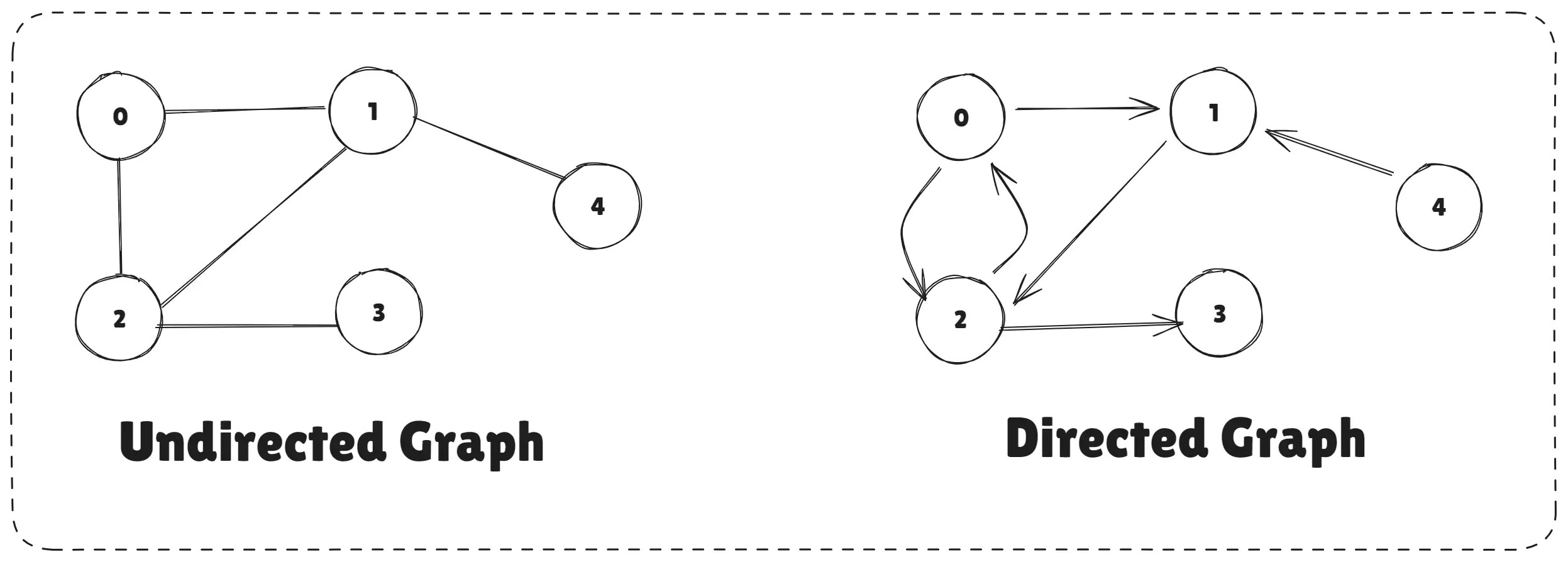
A graph is a way to represent data as a network. In this network:
- Nodes represent entities (like people, places, or objects).
- Edges represent the relationships between these entities (one-to-one, one-to-many, many-to-many, etc.).
Examples: Transportation system: cities as nodes, routes as edges Social media: users as nodes, friendships/follows as edges
Types of Graphs Directed Graph: Edges have a direction Undirected Graph: Edges don’t have direction
What is Graph
Graphs are powerful because they:
- Represent workflows clearly
- Support branching, loops, and conditions
- Make complex processes easier to control
2. What is LangGraph?
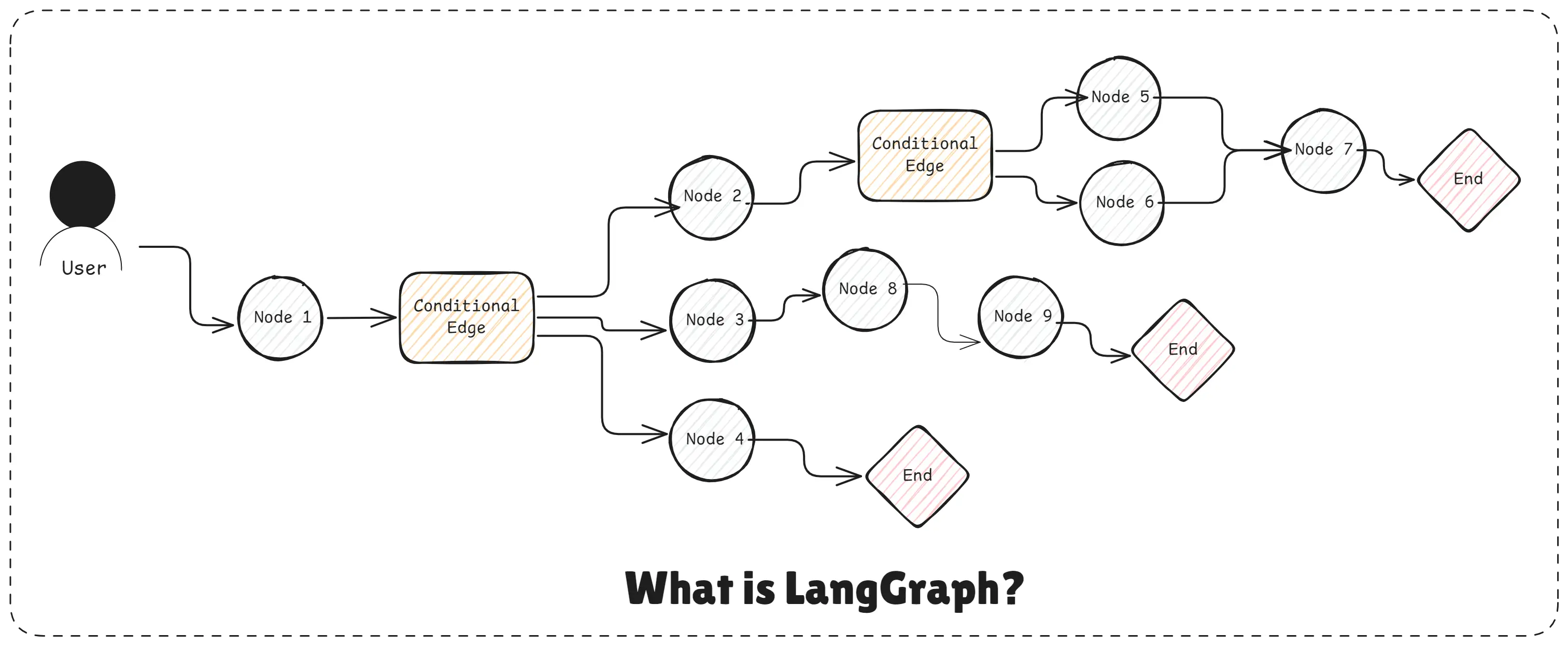
LangGraph is a graph-based framework for building controlled, reliable AI agents and Agentic RAG systems. It allows developers to design AI workflows as clear step-by-step processes (nodes and edges), giving full control over execution flow while letting LLMs make limited, safe decisions.
LangGraph solves the problem of uncontrolled AI autonomy by turning agent logic into predictable, debuggable, and production-ready workflows.
What is LangGraph
LangGraph helps you build AI agents with structure, control, and safety instead of relying on unpredictable LLM behavior.
3. What are The Main Components of Langgraph?
LangGraph is built around the idea of structured AI workflows. Each component plays a specific role in controlling how an AI agent thinks, acts, and uses tools.
LangGraph components work together to give structure, control, and reliability to AI agent workflows.
- Nodes
- Edges
- Conditional Edges
- State
- Entry Node
- End Nodes
- Tools
- LLM Nodes
- Loop & Retry Logic
- Checkpointing & Persistence
1. Nodes
Nodes represent individual steps in an AI workflow. Each node performs a specific task such as rewriting a query, retrieving documents, ranking results, or generating an answer.
Example: LLM Node (callOpenAI)
async function callOpenAI(state) {
  const response = await llm.invoke(state.messages);
  return {
    messages: [response],
  };
}
Example: Logic Node (analyzeQuestion)
async function analyzeQuestion(state) {
  const text = state.messages.at(-1).content;
  const isMath = /d+[+-*/]d+/.test(text);

  return {
    messages: state.messages,
    questionType: isMath ? "math" : "general",
  };
}
Every node:
- Reads data from
state - Performs a task
- Returns updated state
2. Edges
Edges define the execution flow between nodes. They control which node runs next and allow workflows to follow a fixed order or branch based on conditions.
Example: Fixed Edge Flow
.addEdge(START, "callOpenAI")
.addEdge("callOpenAI", END);
This means:
START → callOpenAI → END3. Conditional Edges
Conditional edges add decision logic to the workflow. They determine the next step based on conditions such as confidence score, validation results, or user input.
Example: Router Function
function routeQuestion(state) {
  return state.questionType === "math"
    ? "handleMath"
    : "handleGeneral";
}
Example: Conditional Edge Definition
.addConditionalEdges("analyzeQuestion", routeQuestion, {
  handleMath: "handleMath",
  handleGeneral: "handleGeneral",
});
This is how LangGraph avoids messy if/else chains.
4. State
State is the shared memory of the workflow. It stores data like user queries, rewritten queries, retrieved documents, scores, and intermediate results, allowing nodes to communicate with each other.
Example: Conceptual State Shape
const state = {
  messages: [],
  questionType: "",
};
Updating State in a Node
return {
  messages: [...state.messages, response],
};
State flows through the entire graph and keeps everything connected.
Every node:
- Reads from state
- Updates state
- Passes it forward
5. Entry Node
The entry node __start__ is the starting point of the LangGraph workflow. It defines where execution begins when a user sends a request.
Example
.addEdge(START, "analyzeQuestion");Execution always starts from START.
6. End Nodes
End nodes __end__ define when and how the workflow stops. They prevent infinite loops and ensure the system exits safely after completing its task.
Example
.addEdge("handleMath", END)
.addEdge("handleGeneral", END);
Once reached, the workflow exits safely.
7. Tools
Tools are external actions that the workflow can perform, such as searching a vector database, calling APIs, running calculations, or accessing external services.
Example (Conceptual Tool Node)
async function searchTool(state) {
  const results = await searchDatabase(state.query);
  return { results };
}
Tools are usually wrapped inside nodes.
8. LLM Nodes
LLM nodes use large language models for reasoning, decision-making, query rewriting, validation, or response generation within the controlled workflow.
Example: Math LLM Node
async function handleMath(state) {
  const response = await llm.invoke([
    new SystemMessage("Solve step by step."),
    state.messages.at(-1),
  ]);

  return { messages: [...state.messages, response] };
}
Example: General LLM Node
async function handleGeneral(state) {
  const response = await llm.invoke([
    new SystemMessage("Answer clearly."),
    state.messages.at(-1),
  ]);

  return { messages: [...state.messages, response] };
}
9. Loops & Retry Logic
Loops allow the workflow to retry certain steps when results are insufficient. This is essential for improving accuracy in RAG systems through repeated retrieval or refinement.
Example (Conceptual Retry Pattern)
function shouldRetry(state) {
  return state.score < 0.7 ? "retryNode" : END;
}
This is commonly used in:
- RAG retrieval retries
- Validation loops
- Answer refinement
10. Checkpointing & Persistence
Checkpointing enables saving and restoring workflow state. This helps with debugging, monitoring, long-running processes, and auditability in production systems.
Conceptual Example
const graph = workflow.compile({
  checkpointer: myCheckpointer,
});
This is critical for long-running or production-grade AI agents.
4. Node vs Tool
Understanding the difference between Nodes and Tools is very important when building AI agents with LangGraph.
What is a Node?
A Node is a step in the workflow. It controls when something happens and what happens next in the process.
Nodes are responsible for:
- Executing logic
- Reading and updating shared state
- Deciding the next step in the graph
Examples of nodes:
- Rewrite user query
- Retrieve documents
- Rank results
- Generate final answer
What is a Tool?
A Tool is an external action or capability that performs a specific task.
Tools are responsible for:
- Fetching data
- Calling APIs
- Searching databases
- Running calculations
Examples of tools:
- Vector database search
- Web search API
- Calculator
- Database query
Node vs Tool
| Node | Tool |
|---|---|
| Controls workflow | Performs an action |
| Decides next step | Does not control flow |
| Reads & updates state | Returns output |
| Part of LangGraph structure | External function/API |
| Calls tools | Gets called by nodes |
Simple Example
Node: Retrieve Documents
   └── Tool: Vector Database Search
Here:
- The node decides that retrieval should happen
- The tool actually fetches the documents
Nodes control the process. Tools perform the work.
5. Which Problem is Solved by LangGraph?
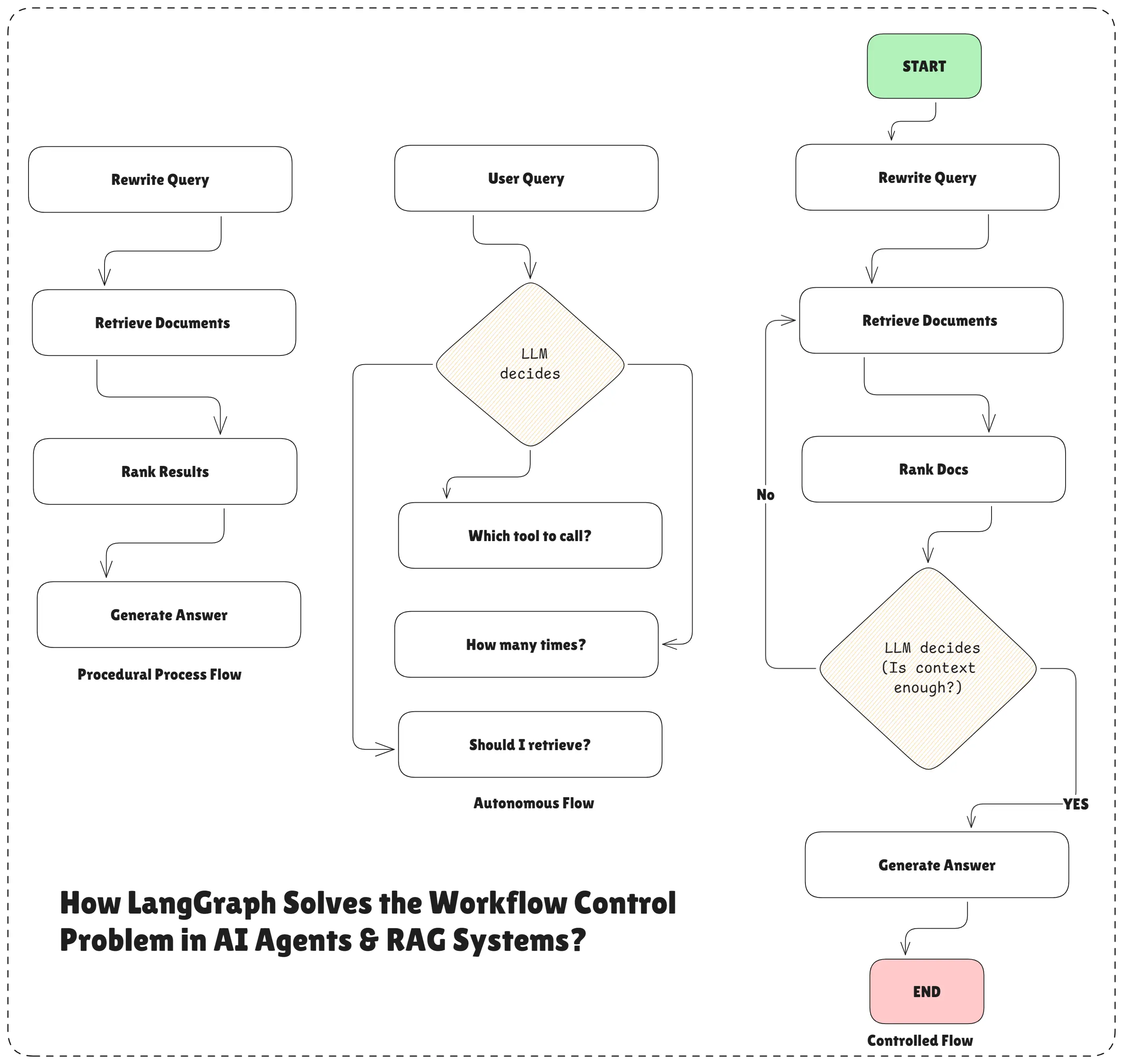
LangGraph solves the workflow control problem in AI agents and RAG systems.
LangGraph fixes the problem where AI (LLMs) become too autonomous, unpredictable, and hard to control especially when calling tools in RAG or agent systems.
Workflow Control Problem
To understand this clearly, we must first understand how different execution flows work in AI agents and RAG systems.
Procedural Process Flow
A procedural process flow is a fixed, step-by-step workflow defined by the developer.
Example:
Rewrite Query → Retrieve Documents → Rank Results → Generate AnswerCharacteristics:
- Steps run in a fixed order
- Easy to debug
- Predictable behavior
Limitation:
- No flexibility
- Cannot adapt dynamically
This works well in traditional software, but AI systems often need some level of decision-making.
Autonomous Flow
In an autonomous flow, the AI model decides everything on its own.
The LLM chooses:
- Which tool to call
- When to call it
- How many times to call it
- Whether to skip steps
Example:
User Query → LLM decides:
  - Should I retrieve?
  - Which tool to call?
  - How many times?
Characteristics:
- LLM controls tool calling
- No fixed order
- Fast to build
- Flexible
Limitation:
- Tools may be skipped or misused
- Tools are called unpredictably
- Hard to debug
- Hard to trust in production
This is exactly what happens when we build RAG systems or agents without LangGraph.
This is the most common problem “The LLM calls tools, but we don’t know why, when, or how many times.” with prompt-based agents and RAG systems.
Controlled Flow
LangGraph introduces a controlled flow, which is a balance between procedural and autonomous flows.
How controlled flow works:
- Developer defines the workflow (graph)
- Steps are explicit (nodes)
- Tool calls are explicit
- LLM is allowed to decide only where needed
Example:
Rewrite Query → Retrieve Docs → Rank Docs →
LLM decides: “Is context enough?”
   → Yes → Generate Answer
   → No  → Retrieve Again
Benefits:
- Developer controls the flow
- LLM assists with decisions
- Tools are not called randomly
- Behavior is predictable and safe
- Production-ready
LangGraph is built to support controlled flows.
Which Problem LangGraph Actually Solves?
LangGraph turns autonomous AI behavior into controlled, predictable, and production-ready workflows.
More specifically, it solves:
- Lack of control over tool calling
- Hidden workflows inside prompts
- Unpredictable agent behavior
- Difficulty in debugging and auditing
- Unsafe production deployments
LangGraph ensures:
- Tools are called in a defined flow
- Developers control the process
- LLM gets limited, safe decision-making power
6. Why Use LangGraph?
LangGraph is used because modern AI agents need control, not just intelligence.
When AI systems are built only with prompts or agent SDKs, the LLM becomes too autonomous. It decides when to call tools, how many times to call them, and in what order. This leads to unpredictable behavior and unreliable results.
LangGraph solves this by giving developers full control over the workflow while still allowing the LLM to assist with decisions when needed.
Why LangGraph is important
- Ensures tools are called in a fixed and safe order
- Prevents skipping important steps like retrieval or validation
- Makes AI behavior predictable and debuggable
- Supports retries, loops, and conditional logic
- Reduces hallucinations in RAG systems
- Makes agents production-ready, not just demo-ready
LangGraph is used when accuracy, safety, and reliability matter more than speed or shortcuts.
7. How Does LangGraph Work?
LangGraph works by turning an AI agent into a graph-based workflow, where every step is clearly defined “what should happen, in what order, and under what conditions” and controlled instead of being hidden inside prompts.
Let’s understand the diagram step by step.
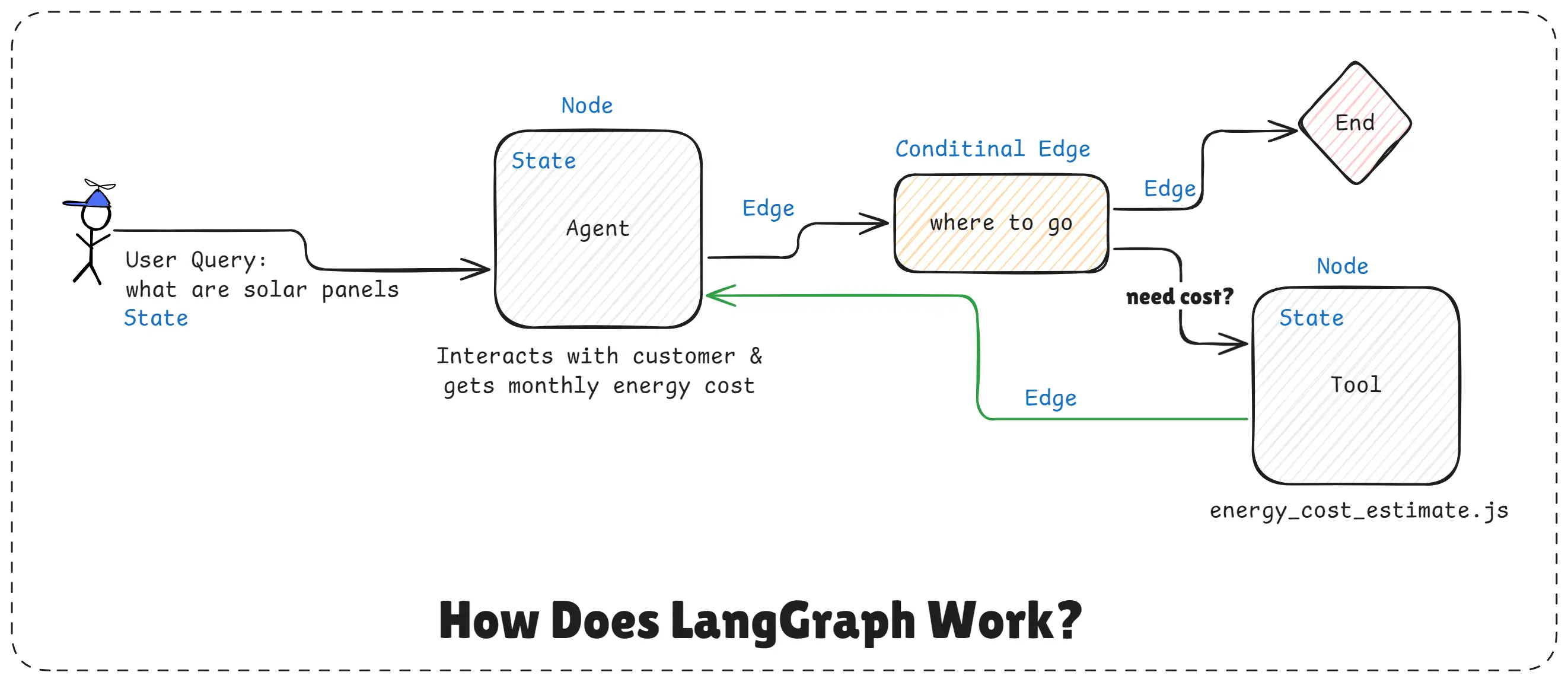
How Does LangGraph Work
Step 1: State - User Input Enters the System
On the left side, the State holds the user query:
“what are solar panels”State acts like shared memory. It carries the user query and all intermediate data as the workflow moves forward.
Step 2: Node - Agent Node
The query goes into a Node called Agent.
This node:
- Interacts with the user
- Understands the intent
- May collect extra details (like energy usage, cost, etc.)
At this point, the agent is not randomly calling tools. It is just processing information and updating the state.
Step 3: Conditional Edge - Decision Making
Next comes the Conditional Edge labeled:
“where to go”This is the most important part.
Here:
- LangGraph checks the current state
- Makes a controlled decision:
- Should the workflow end now?
- Or should it call a tool?
This decision can be:
- Rule-based (if data exists → end)
- LLM-assisted (if more info needed → use tool)
This is where LangGraph gives limited decision power to the LLM, not full control.
Step 4: Node - Tool Execution (If Needed)
If the condition says more data is required, the flow moves to a Tool Node:
energy_cost_estimate.jsThis tool:
- Performs a specific action
- Calculates energy cost
- Returns results
The tool output is stored back into the state.
Important point: Tools are not called by the LLM randomly. They are called only when the graph allows it.
Step 5: Loop Back or End
After the tool runs:
- Updated state flows back to the Agent
- The conditional edge runs again
Now LangGraph checks:
- Is the information enough?
- Yes → go to End
- No → repeat the flow
This creates a safe loop, not an infinite or uncontrolled one.
Step 6: End Node - Safe Exit
Once the goal is achieved, the workflow reaches the End node.
This ensures:
- No infinite loops
- No unnecessary tool calls
- Predictable completion
What This Diagram Proves
Without LangGraph:
- LLM decides when to call tools
- No control over flow
- Hard to debug
With LangGraph:
- Developer controls the workflow
- Tools are called in a defined flow
- LLM only assists in decisions
- System becomes predictable and production-ready
LangGraph works by controlling when agents think, when tools run, and when workflows stop using a graph instead of prompts.
8. How to Build AI Agents Using LangGraph
You can build AI agents without LangGraph, but when systems grow bigger, lack of control becomes the biggest problem. LangGraph helps you build structured, reliable, and production-ready AI agents using clear workflows.
Simple Workflow: Basic AI Conversation
Let’s start with the simplest case, a single-step AI conversation, but built properly using LangGraph.

Basic Workflow - Basic AI Conversion
What’s happening here?
- User sends a message
- AI model processes it
- Response is returned
- Workflow ends
Code: Simple LangGraph Workflow
// Simple LangGraph Workflow: Basic AI Conversation
import "dotenv/config";
import {
  StateGraph,
  MessagesAnnotation,
  START,
  END,
} from "@langchain/langgraph";
import { ChatOpenAI } from "@langchain/openai";
import { HumanMessage } from "@langchain/core/messages";

// Step 1: Initialize the AI model
const llm = new ChatOpenAI({
  model: "gpt-4o-mini",
  apiKey: process.env.OPENAI_API_KEY,
});

// Step 2: Create the OpenAI Call Node
async function callOpenAI(state) {
  console.log(
    "Calling OpenAI with:",
    state.messages[state.messages.length - 1].content
  );

  const response = await llm.invoke(state.messages);
  console.log("AI Response:", response.content);

  // Return the new messages to be added to state
  return {
    messages: [response],
  };
}

// Step 3: Build the workflow & compile it
const workflow = new StateGraph(MessagesAnnotation)
  .addNode("callOpenAI", callOpenAI)
  .addEdge(START, "callOpenAI")
  .addEdge("callOpenAI", END);

// Compile the workflow
const graph = workflow.compile();

// Step 4: Run the workflow
async function runWorkflow() {
  const userQuery = "What is the capital of Uttar Pradesh?";
  const initialState = {
    messages: [new HumanMessage(userQuery)],
  };

  const result = await graph.invoke(initialState);

  console.log(
    "Final Result:",
    result.messages[result.messages.length - 1].content
  );
}

runWorkflow();
Command:
node simple-workflow.jsOutput:
Calling OpenAI with: What is the capital of Uttar Pradesh?
AI Response: The capital of Uttar Pradesh is Lucknow.
Final Result: The capital of Uttar Pradesh is Lucknow.
Advanced Workflow: Multi-Step Agent with Conditional Logic
When Simple Agents Are Not Enough, now imagine:
- Math questions need step-by-step reasoning
- General questions need concise answers
- Some questions require tools
- Some need retries or validations
Without structure, this turns into a mess of conditions. With LangGraph, it becomes a clean decision tree.
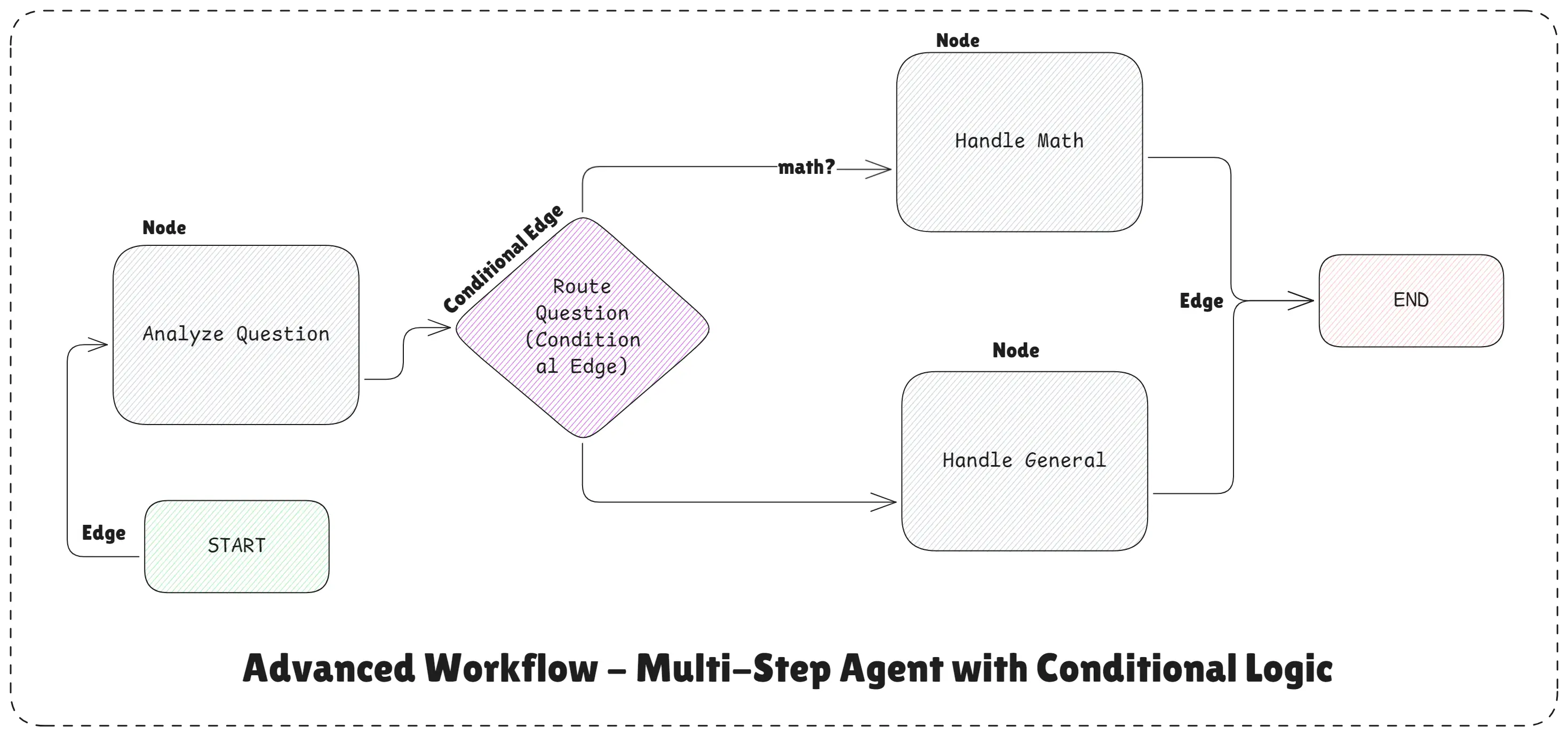
Advanced Workflow - Multi-Step Agent with Conditional Logic
What’s happening here?
- Analyzes the question
- Decides:
- Math question → math handler
- General question → general handler
- Uses different system prompts
- Returns the final response
This is a real agent, not just a chatbot.
Code: Advanced LangGraph Workflow
// Advanced LangGraph Workflow: Multi-Step Agent with Conditional Logic
import "dotenv/config";
import {
  StateGraph,
  MessagesAnnotation,
  START,
  END,
} from "@langchain/langgraph";
import { ChatOpenAI } from "@langchain/openai";
import { HumanMessage, SystemMessage } from "@langchain/core/messages";

// Step 1: Initialize the AI model
const llm = new ChatOpenAI({
  model: "gpt-4o-mini",
  apiKey: process.env.OPENAI_API_KEY,
});

// Step 2: Create the State Graph Nodes

// Node 1: Analyze the question
async function analyzeQuestion(state) {
  const userMessage = state.messages[state.messages.length - 1].content;
  console.log("Analyzing question:", userMessage);

  // Check if it's a math question or a general question
  const isMath =
    /d+s*[+-*/]s*d+/.test(userMessage) ||
    userMessage.toLowerCase().includes("calculate") ||
    userMessage.toLowerCase().includes("math");

  console.log(`Question type: ${isMath ? "MATH" : "GENERAL"}`);

  return {
    messages: state.messages,
    questionType: isMath ? "math" : "general",
  };
}

// Node 2: Handle math questions
async function handleMath(state) {
  console.log("Processing math question...");

  const userMessage = state.messages[state.messages.length - 1].content;

  // Create messages array with system message for context
  const messages = [
    new SystemMessage(
      "You are a math expert. Solve problems step by step with clear explanations."
    ),
    new HumanMessage(userMessage),
  ];

  const response = await llm.invoke(messages); // Returns AIMessage

  console.log("Math solution ready");

  return {
    messages: [...state.messages, response],
  };
}

// Node 3: Handle general questions
async function handleGeneral(state) {
  console.log("Processing general question...");

  const userMessage = state.messages[state.messages.length - 1].content;

  // Create messages array with system message for context
  const messages = [
    new SystemMessage(
      "You are a helpful and friendly assistant. Provide clear and concise answers."
    ),
    new HumanMessage(userMessage),
  ];

  const response = await llm.invoke(messages); // Returns AIMessage

  console.log("General response ready");
  return {
    messages: [...state.messages, response],
  };
}

// Router (Conditional Logic): Decide which node to call next
function routeQuestion(state) {
  console.log(
    `Routing to: ${
      state.questionType === "math" ? "MATH handler" : "GENERAL handler"
    }`
  );

  if (state.questionType === "math") {
    return "handleMath";
  }
  return "handleGeneral";
}

// Step 3: Build the advanced workflow & compile it
const advancedWorkflow = new StateGraph(MessagesAnnotation)
  // Add nodes to the graph
  .addNode("analyzeQuestion", analyzeQuestion)
  .addNode("handleMath", handleMath)
  .addNode("handleGeneral", handleGeneral)
  // Add edges to the graph
  .addEdge(START, "analyzeQuestion")
  .addConditionalEdges("analyzeQuestion", routeQuestion, {
    handleMath: "handleMath",
    handleGeneral: "handleGeneral",
  })
  .addEdge("handleMath", END)
  .addEdge("handleGeneral", END);

// Compile the workflow
const advancedGraph = advancedWorkflow.compile();

// Step 4: Run the workflow
async function runAdvancedExample() {
  // Test 1: Math question
  console.log("
Test 1: Math Question");
  console.log("-".repeat(50));
  let result = await advancedGraph.invoke({
    messages: [new HumanMessage("What is 15 * 4?")],
  });
  console.log("Answer:", result.messages[result.messages.length - 1].content);

  // Test 2: General question
  console.log("
Test 2: General Question");
  console.log("-".repeat(50));
  result = await advancedGraph.invoke({
    messages: [new HumanMessage("What is the capital of India?")],
  });
  console.log("Answer:", result.messages[result.messages.length - 1].content);
}

runAdvancedExample();
Command:
node advanced-workflow.jsOutput:
Test 1: Math Question
--------------------------------------------------
Analyzing question: What is 15 * 4?
Question type: MATH
Routing to: GENERAL handler
Processing general question...
General response ready
Answer: 15 * 4 equals 60.

Test 2: General Question
--------------------------------------------------
Analyzing question: What is the capital of India?
Question type: GENERAL
Routing to: GENERAL handler
Processing general question...
General response ready
Answer: The capital of India is New Delhi.
Useful Resources for Building AI Agents with LangGraph
If you want to go deeper and actually understand how AI agents, LangGraph, and RAG systems work in real projects, these resources are worth bookmarking:
- LangChain Docs
- LangGraph Docs
- Introduction to AI Agents
- Introduction to RAG
- Master Prompt Engineering
These resources together will help you move from basic prompt-based AI to structured, production-ready AI agents using LangGraph and modern agentic workflows.
Final Thoughts on building AI agents with LangGraph
Yes, you can build AI agents without LangGraph. Just like you can build an app without thinking much about architecture.
At the start, everything feels okay. The demo works. The output looks right.
But once your AI system grows more steps, more tools, more decisions, some memory, and real users, things start to break. Debugging becomes painful, behavior becomes inconsistent, and scaling feels risky. This is where LangGraph actually helps.
LangGraph brings structure to your AI logic. Instead of random prompt chains, you get clear workflows, proper state handling, and predictable execution. It feels less like “trying prompts” and more like building real software.
If you’re working on:
- AI agents
- Agent-style workflows
- RAG-based systems
- Anything meant to run in production
Then LangGraph stops being optional. It becomes the thing that keeps your system understandable and stable.
Conclusion
LangGraph helps developers build structured, reliable, and production-ready AI systems.
While it is possible to create AI agents without LangGraph, prompt-based agents quickly become unpredictable, hard to debug, and difficult to scale as systems grow. This is especially true for RAG pipelines, tool-calling agents, and multi-agent workflows.
LangGraph solves this by introducing clear workflows, controlled decision-making, and explicit tool execution. It gives developers full control over how an AI agent thinks, acts, and loops, while still allowing the LLM to assist where needed.
In simple terms:
- Prompts are good for experiments
- LangGraph is built for real-world AI systems
If your goal is to build safe, scalable, and maintainable AI agents, LangGraph is the right foundation.
Happy building AI agents workflows with LangGraph and LangChain!