Introduction to AI Agents: Understanding LLMs, Agentic Workflows, and Building Your Own AI Agent with Node.js

AI Agents vs LLMs
A beginner-friendly guide to LLMs, AI Agents, Agentic Workflows, Multi-Agent Systems, and the difference between Generative AI and Agentic AI. Includes a Node.js & OpenAI code example with Weather, GitHub, and Linux tools.
1. What is an LLM (Large Language Model)?
An LLM (Large Language Model) is a machine-learning model trained on a massive amount of text. It predicts and generates human-like text: answers, summaries, translations, code, etc.
Analogy:
Imagine an LLM as a very well-read librarian. It has read millions of books and can quote or rephrase information. The librarian can talk about topics but cannot go out and act (it won’t press buttons, call APIs, or run code by itself).
Why it matters:
LLMs are excellent at understanding and producing language. They are the “brain” used inside many agents, but by themselves they typically don’t take actions in the real world.
2. What is an Agent?
An Agent is a piece of software that can observe, decide, and act to achieve a goal. It might be rule-based or smart depending on the design.
Analogy:
An agent is like a personal assistant. You tell it “get groceries,” and it figures out the steps, contacts shops, and completes the order.
Key parts of a (non-AI) agent:
- Input/perception
- Decision logic or planner
- Action executor (calls APIs, runs scripts)
- State (optional logging)
3. What is an AI Agent?
An AI Agent combines an LLM (for reasoning) with tools, a planner, memory, and action capabilities. It both decides and does.
Main components:
- LLM (Reasoner): suggests next steps, interprets user intent.
- Tool layer (Tool Box): functions or APIs the agent can call (e.g., weather API, DB, shell).
- Orchestrator (Planner): splits tasks into steps and assigns tools.
- Memory (Conversational History): short-term or long-term storage (DB or cache).
- Validator & Monitor: checks results and re-runs steps if needed.
- NLP (Natural Language Processing): NLP is a branch of Artificial Intelligence that helps computers understand, interpret, and generate human language just like humans do.
Analogy:
If an LLM is a smart writer, an AI Agent is a smart employee who not only writes the plan, but also uses phone, browser, and apps to finish the work.
4. What is an Agentic Workflow?
An agentic workflow is a sequence of steps an AI Agent follows to finish a task with minimal human intervention. Each step may include thinking, selecting tools, running actions, and validating results.
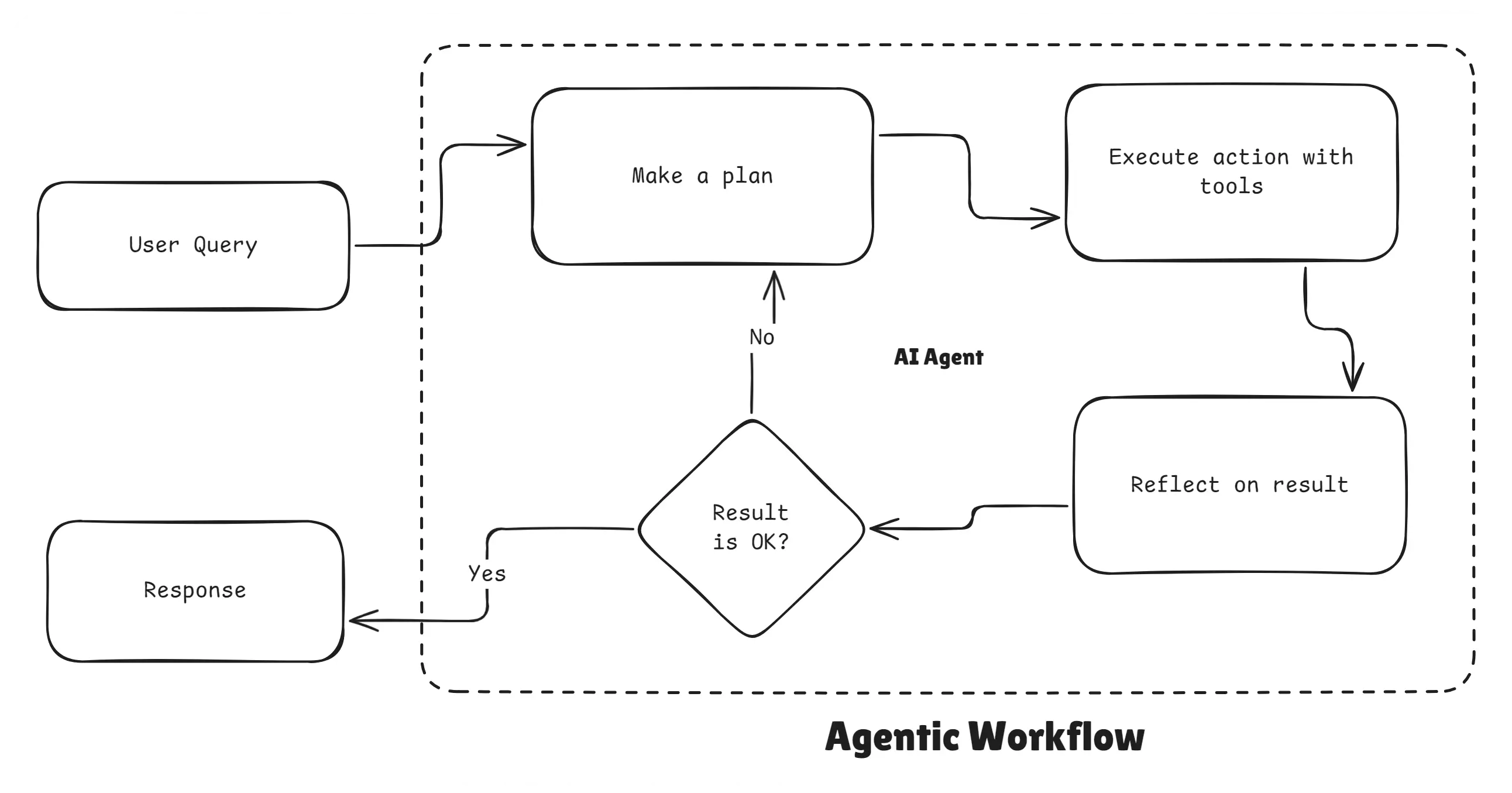
Agentic Workflow
Analogy:
A workflow is like a recipe. The chef (agent) follows the recipe (workflow) step-by-step: prepare ingredients (data), cook (call tools), taste (validate), adjust (loop) and serve (final output).
Example:
Task: “Find the cheapest train from Mumbai to Pune tomorrow and book it.”
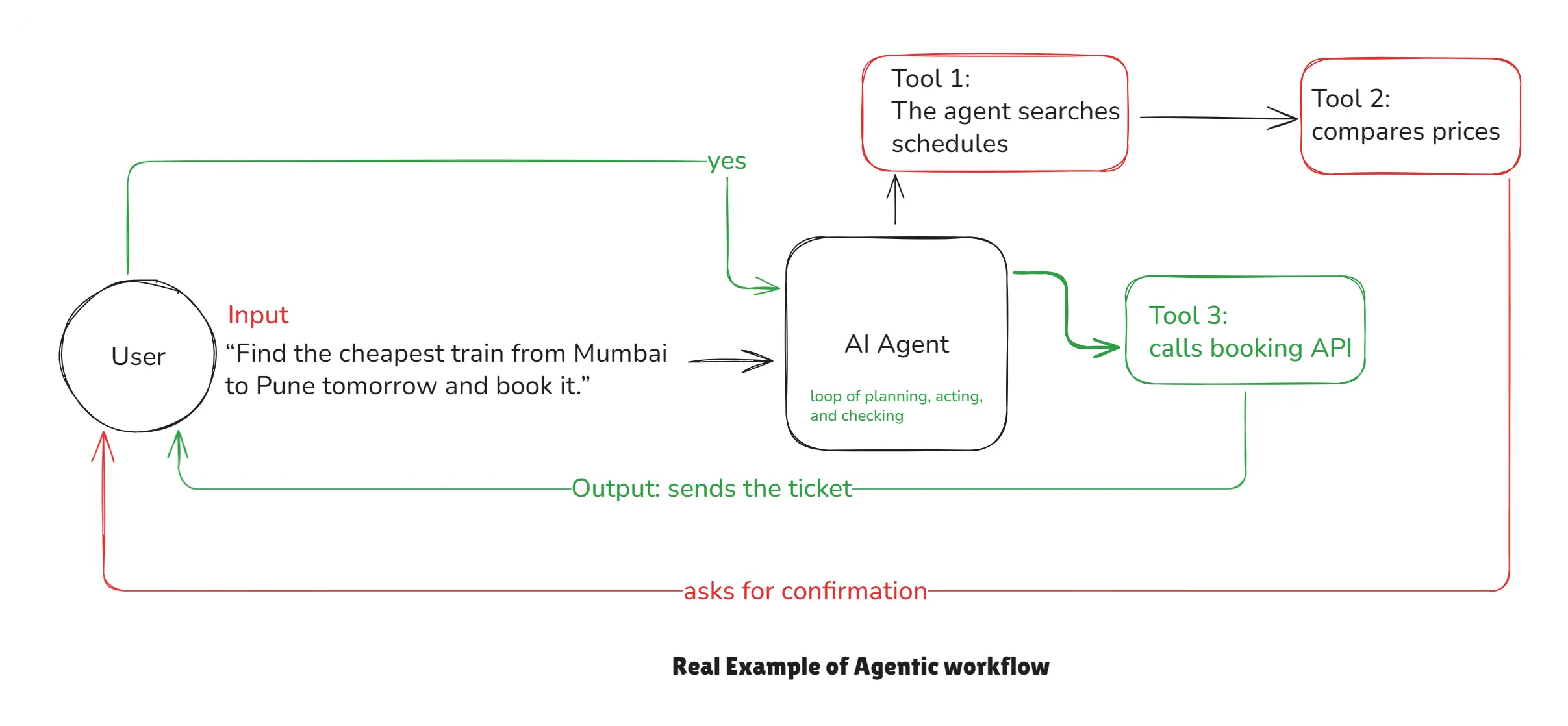
Agentic Workflow Example
5. What is the difference between AI Agents and LLMs?
- LLM = language understanding & generation (answers).
- AI Agent = LLM + planning + tools + actions (does work).
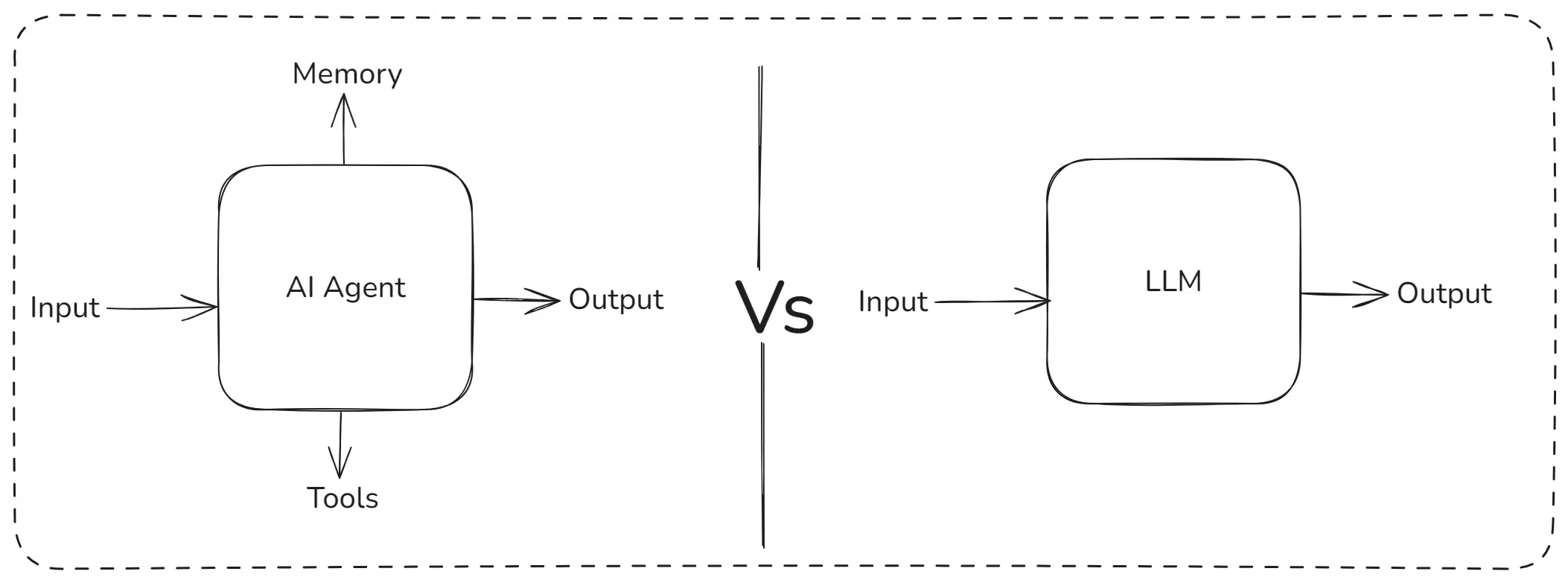
AI Agents vs LLMs
| Aspect | LLM | AI Agent |
|---|---|---|
| Output | Text | Text and Actions |
| Tools | No built-in tools | Uses tools and APIs |
| Use cases | Generate content, chat | Automate tasks, orchestrate tools |
Analogy:
- LLM = knowledgeable person
- Agent = knowledgeable person with hands and apps who actually completes tasks
6. What is a Multi-Agentic Workflow?
A multi-agentic workflow uses multiple agents, each with a specific skill.
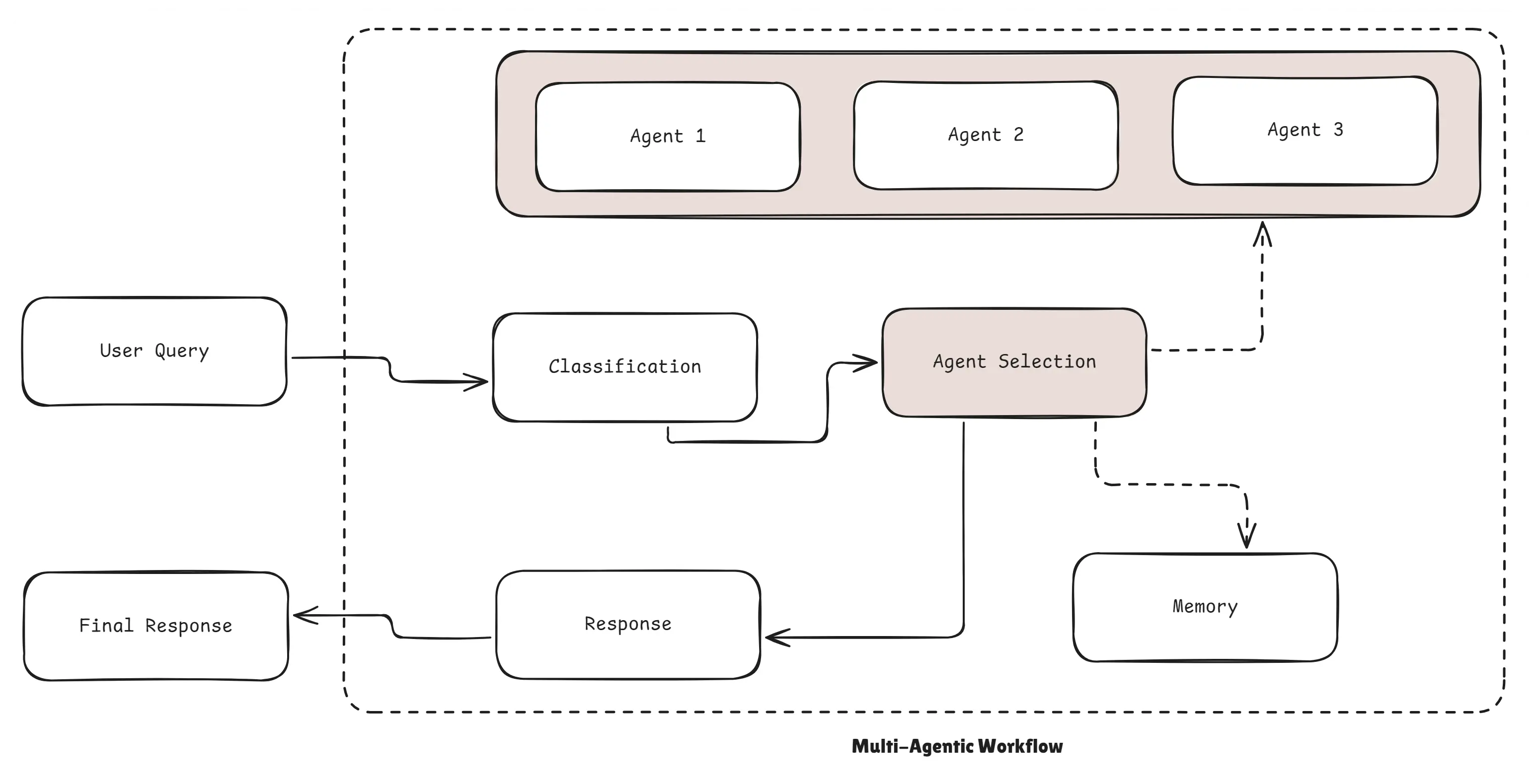
Multi-Agentic Workflow
Example: This is like a company team:
- Agent 1 is researcher
- Agent 2 is programmer
- Agent 3 is debugger
- Agent 4 is reviewer
Each AI Agent has a role and they collaborate to finish the project.
7. What is the difference between Generative AI and Agentic AI?
Generative AI focuses on creating content like text, images, or code, while Agentic AI goes beyond creation and actually performs actions, uses tools, makes decisions, and completes tasks autonomously. In short: Generative AI produces output, and Agentic AI produces outcomes.
| Generative AI | Agentic AI |
|---|---|
| Creates content | Completes tasks |
| Text/Image generation | Tool usage & Automation |
| No memory | Memory & Planning |
8. Creating own AI Agent using Node.js & OpenAI
In this section, we will build a fully functional AI Agent using Node.js & OpenAI that can think, plan, and use tools just like a real agentic system.
To keep things simple and practical, our agent will be able to use 3 tools:
- Weather Tool: Fetch real-time weather
- GitHub Tool: Get public user information
- Linux Tool: Execute safe system commands on the machine
This example demonstrates how an AI Agent can think, call tools, observe results, and return a final answer using a structured multi-step reasoning workflow.
How This AI Agent Works
This AI agent follows the format:
START → THINK → TOOL → OBSERVE → THINK → OUTPUT
Here’s what each step means:
- START: The agent identifies the user’s intent
- THINK: It performs chain-of-thought style reasoning to decide next actions
- TOOL: Calls a relevant tool (weather, GitHub, or Linux)
- OBSERVE: Receives the tool’s output
- OUTPUT: Returns the final helpful answer to the user
This structured method forces the agent to be predictable, explain its reasoning, and use tools safely.
Tools We Are Building
Tool 1: Weather Tool
Fetches real-time weather using city name
async function getWeatherDetailsByCity(cityname = "") {
  const city = cityname.toLowerCase()
  const url = `https://wttr.in/${cityname}?format=%C+%t`;
  const { data } = await axios.get(url, { responseType: "text" });
  return "The current weather of ${cityname} is ${data}";
}
Tool 2: Linux Command Executor
Executes safe linux/unix commands on localhost
async function executeCommand(cmd = "") {
  return new Promise((res, rej) => {
    exec(cmd, (error, data) => {
      if (error) {
        return res(`Error running command ${error}`);
      } else {
        res(data);
      }
    });
  });
}
⚠️ IMPORTANT: Use a whitelist for commands in real production. Never allow arbitrary commands.
Tool 3: GitHub User Info Fetcher
Fetches public GitHub profile information
async function getGithubUserInfoByUsername(username = "") {
  const url = `https://api.github.com/users/${username.toLowerCase()}`;
  const { data } = await axios.get(url);
  return JSON.stringify({
    login: data.login,
    id: data.id,
    name: data.name,
    location: data.location,
    twitter_username: data.twitter_username,
    public_repos: data.public_repos,
    public_gists: data.public_gists,
    user_view_type: data.user_view_type,
    followers: data.followers,
    following: data.following,
  });
}
Tool Registration (Tool Map)
We create a TOOL_MAP so the AI can call tools by name:
const TOOL_MAP = {
  getWeatherDetailsByCity: getWeatherDetailsByCity,
  executeCommand: executeCommand,
  getGithubUserInfoByUsername: getGithubUserInfoByUsername,
};
Writing the System Prompt (Agent Brain)
This is the core intelligence layer that tells the agent:
- How to think
- When to think
- How to break problems
- How to call tools
- How to behave
It also defines the 5-step structure:
START → THINK → TOOL → OBSERVE → OUTPUT
Here’s the structured system prompt:
const SYSTEM_PROMPT = `
    You are an AI assistant who works on START, THINK, OBSERVE, TOOL and OUTPUT format.
    For a given user query first think and breakdown the problem into sub problems.
    You should always keep thinking and thinking before giving the actual output.

    Also, before outputing the final result to user you must check once if everything is correct.
    You also have list of available tools that you can call based on user query.

    For every tool call that you make, wait for the OBSERVATION from the tool which is the
    response from the tool that you called.

    Available Tools:
    - getWeatherDetailsByCity(cityname: string)
    - executeCommand(command: string)
    - getGithubUserInfoByUsername(username: string)

    Rules:
    - Strictly follow the output JSON format
    - Always follow sequence START → THINK → TOOL → OBSERVE → OUTPUT
    - Perform only one step at a time
    - Wait for observation when tool is used
    - Think multiple times before final output

    Output JSON Format:
    { "step": "START | THINK | OUTPUT | OBSERVE | TOOL" , "content": "string", "tool_name": "string", "input": "string" }
`;
This prompt creates a deterministic AI Agent with predictable behavior.
The Main AI Agent Loop (Important)
This loop continuously:
- Sends messages to OpenAI
- Receives structured JSON
- Parses the agent’s step
- Executes tool if needed
- Sends observation back
- Repeats until OUTPUT step happens
const messages = [
  {
    role: "system",
    content: SYSTEM_PROMPT,
  },
  {
    role: "user",
    content: "In the current directory, read the changes via git and push the changes to github with a good commit message",
  },
];

while (true) {
  const response = await client.chat.completions.create({
    model: "gpt-4.1-nano",
    messages: messages,
  });

  const rawContent = response.choices[0].message.content;
  const parsedContent = JSON.parse(rawContent);
  console.log(parsedContent);

  messages.push({
    role: "assistant",
    content: JSON.stringify(parsedContent),
  });

  if (parsedContent.step === "START") {
    console.log("🔥", parsedContent.content);
    continue;
  }

  if (parsedContent.step === "THINK") {
    console.log("🧠", parsedContent.content);
    continue;
  }

  if (parsedContent.step === "TOOL") {
    const toolToCall = parsedContent.tool_name;

    if (!TOOL_MAP[toolToCall]) {
      messages.push({
        role: "developer",
        content: `There is no such tool as ${toolToCall}`,
      });
      continue;
    }

    const responseFromTool = await TOOL_MAP[toolToCall](parsedContent.input);
    console.log(`🛠️: ${toolToCall}(${
              parsedContent.input
            }) = `, responseFromTool);

    messages.push({
      role: "developer",
      content: JSON.stringify({ step: "OBSERVE", content: responseFromTool }),
    });
    continue;
  }

  if (parsedContent.step === "OUTPUT") {
    console.log("🤖", parsedContent.content);
    break;
  }
}
Final Summary for Implementation:
By creating your own AI Agent with Node.js and OpenAI tools, you’ve unlocked the entire world of agentic automation, tool-driven intelligence, and AI-powered developer workflows. The same architecture can be extended into complete multi-agent systems, intelligent assistants, or AI-powered dev tools.
9. Exactly, Now We Understand How Perplexity AI Works Internally
Perplexity AI is one of the most advanced AI search engines today, but the interesting part is it does not rely on a single LLM that it built itself. Instead, its power comes from how cleverly it connects multiple LLMs, search systems, APIs, and tools together.
This makes Perplexity less like a traditional chatbot and more like a smart orchestrator that uses many tools to gather accurate information and return high-quality answers with citations.
Perplexity doesn’t depend on its own brain (LLM), it depends on its tools. And those tools can be built in any programming language.
Conclusion
You now have a clear understanding of how today’s AI systems work from simple LLMs to powerful AI Agents that can think, take actions, use tools, and work together through Agentic and Multi-Agent workflows.
Here’s what we covered in simple words:
- LLMs understand and generate text
- Agents can act and solve tasks
- AI Agents combine reasoning + tools + actions
- Agentic Workflows show how agents solve tasks step-by-step
- Multi-Agent systems allow multiple agents to work like a real team
- Generative AI creates content, while Agentic AI completes real tasks
- We built a practical Node.js AI Agent using weather, GitHub, Linux, and Prisma tools
- Perplexity AI works using external LLMs and its own powerful tool layer
This new era of AI is not just about generating text it’s about building smart systems that can take real actions. With the concepts and examples in this article, you’re now ready to create your own agentic AI tools, automate workflows, or even build multi-agent systems.
The future of AI is agentic and you’re now ready to be a part of it.
Happy Building with AI Agents!